 KiloDrive
Driver Operations Manual
Onboarding, vehicles, bidding, trip and delivery execution, earnings, billing, safety, privacy, mobile app, and portal operations.
Reconciled 15 September 2026
Current package and contract: official release facts
Copyright and publication information
Copyright © 2026 Eprecus LLC. All rights reserved.
KiloDrive, the KiloDrive road mark, product names, interfaces, documentation, and original illustrations are owned by or licensed to Eprecus LLC. No part of this publication may be reproduced, redistributed, altered, sold, or represented as official KiloDrive guidance without written permission, except for reasonable personal use and quotations permitted by law.
Edition: 3.0 Publication date: 15
September 2026
Applies to: KiloDrive mobile
applications and portal as described at publication.
This manual explains normal product operation; it is not legal, financial, tax, insurance, medical, or emergency-services advice. In-app terms, plan limits, prices, jurisdiction rules, and administrator-configured controls prevail where they differ from an example in this publication.
OpenStreetMap-derived routing data is used under the Open Database License. Apple, iOS, App Store, Google, Android, Google Play, and other third-party marks belong to their respective owners.
Table of contents
Edition 3.0: current workflow, expected results, and recovery
Local enhancement: mapped route preview before responding
Illustrated driver onboarding, bidding, trip, and recovery procedures
Introduction
This manual is the operating reference for individual drivers, business drivers, and authorized fleet drivers. It explains how to prepare a secure account, complete the main service workflows, understand money and membership controls, respond to safety events, and obtain support.
How to use this manual
- Read Requirements and permissions before installing or using the portal.
- Complete the account, identity, and role-specific setup chapters in order.
- Use the operational chapters while performing rides, deliveries, rentals, billing, or administration.
- Consult the safety and incident material before an emergency occurs.
- Use the appendices for technical detail and the final index for subject lookup.
Conventions
Menu → Destination identifies a navigation path. A green callout is operational guidance, amber is a warning, and red identifies immediate safety or loss risk. Currency means the ISO currency of the active country unless expressly stated otherwise. Times originate as UTC and display in the appropriate local timezone.
Minimum requirements and permissions
Mobile application
| Platform | Minimum | Recommended operating condition |
|---|---|---|
| Apple iPhone/iPad | iOS/iPadOS 15.0 or later | Current supported OS release, automatic security updates, working GPS, camera, microphone, notifications, and internet. |
| Android phone/tablet | Android 7.0 (API 24) or later | Android 10 or later, Google Play services where required, current security patches, working GPS, camera, microphone, notifications, and internet. |
Install only from the official App Store or Google Play listing. A stable mobile-data or Wi-Fi connection and access to https://api.kilodrive.com are required for sign-in, current availability, live trip/rental state, payments, and synchronization. Offline-safe actions remain limited and will clearly show pending or failed state.
Permissions
- Location while using the app: pickup, nearby services, navigation, dispatch, route safety, and live trip progress.
- Background/always location: requested only for role and active-service functions that require continued trip or driver telemetry; users receive an explanation before the OS prompt.
- Camera: profile, identity, vehicle, damage, and document capture; in-app calling does not require camera unless a future video feature expressly requests it.
- Photos/files: user-selected images and PDFs through the operating-system picker; KiloDrive does not require broad library access for occasional uploads.
- Microphone: in-app voice calls and voice-enabled features.
- Notifications: OTP/security, bids, trip, delivery, rental, membership, payment, and support alerts.
- Biometrics: optional device biometric app lock; biometric templates remain under operating-system control.
Accessibility and display
Settings → Appearance supports light/dark themes, high contrast, and font scaling up to 1.3×. Critical screens are designed for 320-pixel phones, portrait/landscape tablets, keyboard insets, semantic labels, logical screen-reader order, and minimum touch targets. Currency, timezone, and kilometre/mile presentation follow the selected country and device preferences. Report a clipped, unlabeled, or unreachable control through Support with the screen and device details.
Portal
Use a currently supported version of Chrome, Edge, Safari, or Firefox with JavaScript, TLS 1.2 or later, cookies/session storage, and a screen width of at least 320 CSS pixels. A 1280 × 720 display or larger is recommended for dashboards. PDF downloads require a viewer; exports require sufficient device storage. WebAuthn/passkeys require a compatible browser, HTTPS, and a device/platform authenticator. Do not use compatibility mode or an unsupported embedded browser.
vi–vii1. Driver role and dashboard
The dashboard keeps the primary work controls visible and groups secondary destinations in a collapsed workspace. Expand that workspace only when needed. During a refresh, short labels remain visible instead of technical availability messages; use the relevant refresh action if current data is required.
A KiloDrive driver is an independent service provider who may operate as an individual, sole trader, or registered business. The Driver dashboard brings the workday into one place.
Verification
Track phone, identity, profile photo, vehicle registration and insurance approval.
Offers & active jobs
Review eligible nearby demand, bid, and manage one active assignment safely.
Wallet & billing
Review earnings, membership, payment methods, expiry and payout status.
Compliance & reports
Monitor duty limits, documents, ratings, ledger and downloadable reports.
Primary navigation
Use Home, Verification, Offers, Active jobs, Leaderboard, Wallet, Billing, My vehicle, Reports, Tools, Privacy & Safety, Profile, Settings and Support. Wide layouts use a navigation rail; phones use a bounded, scrollable drawer.
2. Account setup and access
- Install only the official KiloDrive app and complete the welcome wizard.
- Choose Service Provider → Driver, then country and language. Connectivity and API status must pass.
- Sign in by phone OTP (SMS preferred; WhatsApp second), email/password, or an available verified social provider.
- If the phone/social/email is new, finish the account-completion wizard with correctly capitalized first and last names and confirmation email.
- Enter driver details. If operating as a business, select the business account type and provide legal/trading name, registration, tax and contact information.
- New drivers who begin without a password must set one within the configured onboarding window. Use the show/hide password control and a unique password.
Protect access
Enable 2FA, save recovery codes offline, review social connections and device sessions, and enable biometric app lock. Never let another person use your driver session; vehicle assignment does not transfer account access.
Phone verification by automated call
Contact details may offer Call me with a code. The API uses AWS End User Messaging Voice to call the E.164/international-format number and speak the six-digit challenge twice. Requests have a 30-second resend interval, expire after one ten minutes, and locks after repeated failures. If calling is unavailable, use the offered SMS or WhatsApp path.
3. Driver verification
A new driver completes a resumable 12-page journey. It cannot be skipped. Back, Next, Save for later, basic Settings, and Logout keep the driver inside the controlled journey. Progress is server-backed, and a completed driver is never sent backward because a local cache was cleared or a vehicle lookup was temporarily unavailable.
| Step | What you complete |
|---|---|
| 1 | Identity, profile photo, driver's licence details, and front/back evidence |
| 2 | Proof of address and background/police record; defer for up to 21 days where policy allows |
| 3 | Compare Free, Silver, and Gold; purchase or deliberately continue with Free |
| 4 | Review and confirm email and phone |
| 5 | Currency view, distance unit, font/accessibility, and optional 2FA |
| 6 | Add or confirm the existing vehicle, its condition, and images |
| 7-9 | Registration, insurance, and fitness details, expiry dates, and documents |
| 10 | Optional Uber, Lyft, or inDrive review-profile screenshots for an evidence-based starting rating |
| 11 | Set an hourly work-rate assumption, currency view, and km/miles preference. This planning input is not a fare, price, or earnings guarantee. |
| 12 | Open the manuals and legal links, accept Terms and Privacy, then submit - or cancel and request permanent deletion |
3.1 Private document handling
Document handling
Files are private, randomized, magic-byte checked and limited to PDF/JPEG/PNG up to 10 MB. Production storage uses a private S3 bucket. Upload the minimum necessary information and never submit an altered document.
Tap an upload row and choose Take photo, Choose from gallery, or Choose PDF or image. Photo tools correct rotation, allow cropping, remove unnecessary metadata, and compress the image before transfer. The app uploads each file first, then links its private storage reference to the verification case only after the server confirms ownership, signature, malware-scan status, and size. A successful submission is shown as pending; pressing Submit repeatedly is not required.
4. Vehicles and driver assignments
- Open My vehicle and choose Add vehicle.
- Select manufacturer, model and year from the centrally managed catalog; choose category, color and exact plate/tag number.
- Save and upload vehicle images, registration and insurance. Images are compressed and displayed in the vehicle gallery.
- Submit the vehicle for review. Editing verified details resets verification and alerts administrators.
- Activate only a verified, insured vehicle allowed by your plan.
Ownership and assignments
A vehicle can have historical relationships with multiple drivers, but only one active driver assignment at a time. Assignment history preserves start/end time and reason. The plate/tag belongs to the vehicle. Customers may use that plate/tag to create a privacy-preserving block, but will not see hidden driver details.
Archiving
Removing a vehicle archives it rather than erasing trip history. Pending assignments or completed financial records remain auditable.
5. Availability, offers, and bidding
- Complete every verification gate, choose the active vehicle, and set yourself Online.
- Open Offers. Only requests within the dispatch window, country/category and eligibility rules appear.
- Open a request to review origin/destination area, estimated distance/ETA, passenger count, payment method and proposed fare. Where available, use Route preview before responding; estimates do not guarantee live traffic.
- Adjust your bid using the slider or valid amount control. Bid values cannot be negative or exceed 1,000,000 in local currency.
- Submit once. Network retries use a stable idempotency key; stale/closed requests are discarded with a typed message.
- Monitor acceptance. One driver wins atomically; losing bids do not create a trip.
- Accept and work only one active assignment where the rules require it.
Professional dispatch tools
Scheduled availability and preferred service areas help matching. Scheduled rides show whether assignment is pending, reconfirming, replacing a driver, guaranteed, or not guaranteed. A guarantee is shown only after the required driver confirmation and eligibility checks; never treat an early reservation request as assigned work.
Offline queue
Retryable failures (408/425/429/5xx) may enter the bid outbox with expiry-aware backoff and Retry-After. Semantic 4xx errors are terminal. Use failed-queue recovery rather than creating duplicate bids.
11–12Review the mapped route before responding
- While safely parked, open an eligible offer in the Bidding Hall and choose Route preview. Opening it does not send a bid, accept a request, reserve an assignment or create a payment.
- Eligible drivers can also open the map from a pre-bid inquiry or ride counter-offer sheet. Your entered counter-offer is retained. If the request revision changed, return and refresh the offers; an older decision cannot silently use a newer route. Rider bid acceptance does not use this driver-only preview.
- Review Approach to pickup separately from Passenger journey. The approach is the dashed route; the passenger journey uses a separate solid line. Read the distance and duration estimates alongside each heading.
- Read the location and retrieved-time notices. Before assignment, pickup and destination can be approximate areas; hidden stops and exact addresses are not disclosed. Do not treat a privacy-safe marker as the passenger's exact position.
- Choose Expand map for the full-screen view, then Fit entire route to recenter all available segments and stops. Back returns to the preview without accepting the request. This is a pre-acceptance preview, not live journey navigation.
- Return to the offer and use its normal bid/respond controls only after reviewing it. The server rechecks request availability, eligibility and the current revision when you submit.
If location or directions are unavailable
A missing or stale driver position can remove the approach estimate while leaving the passenger journey available. A missing road route is reported explicitly; KiloDrive does not draw a straight line and label it as a road route. Use the request details and retry when safe.
Refresh the preview or queue if the request may have expired. A cached route, retrieved timestamp or duration is not a guarantee of live traffic, a valid assignment, precise pickup access or final fare. On a route error, use the tonal retry; no acceptance or payment has occurred merely because the preview could not load.
6. Execute a passenger trip
The enforced sequence is Requested → Bid accepted → Driver arrived → Trip started → Trip completed, or an authorized cancellation.
Ride types and stops
A request can be immediate or scheduled and can contain explicit intermediate stops, a return/turnaround, waiting time, or an hourly service window. Review every stop, wait allowance, booked minutes, and quoted charge before bidding. Do not treat a stop as free-form destination text; each stop has its own order and lifecycle.
- After acceptance, navigate to pickup and communicate only as needed through the assigned trip chat/call.
- At the pickup geofence, mark Driver arrived. Do not skip this state unless an audited admin override applies.
- Confirm rider and destination; use the rider PIN/geofence confirmation where enabled.
- Start the trip only when the rider is safely aboard.
- Follow navigation, obey road laws and respond to material ETA drift or route-anomaly check-ins.
- At destination, stop safely and complete the trip. GPS may propose/trigger completion only after the driver remains within the configured destination radius for the required dwell period.
- Review payment and earning status. Chat locks and the active call terminates when completed/cancelled.
Recognize Bidding Hall states
Follow the trip lifecycle instructions with these captured examples. Each caption explains the controls actually shown; your available actions depend on account, country and current record state.
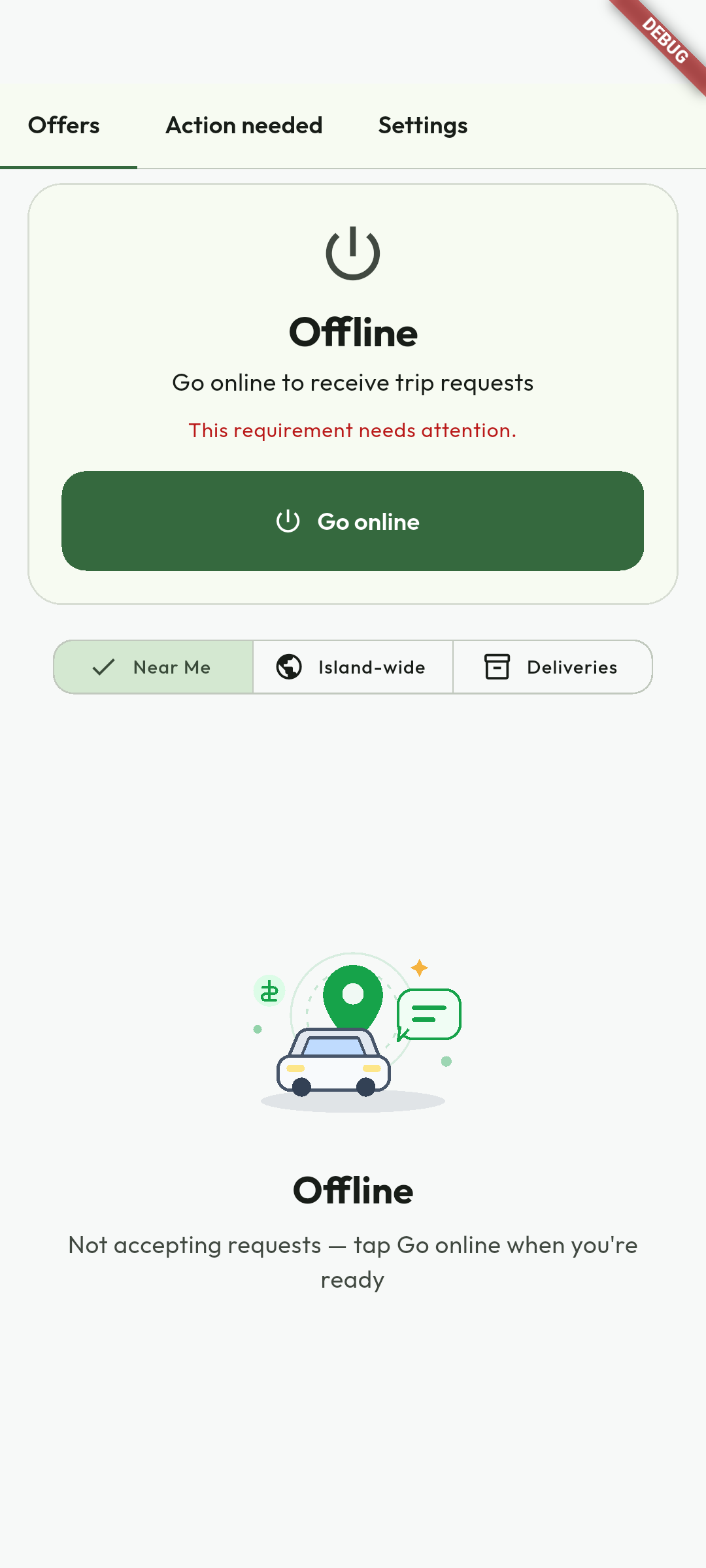
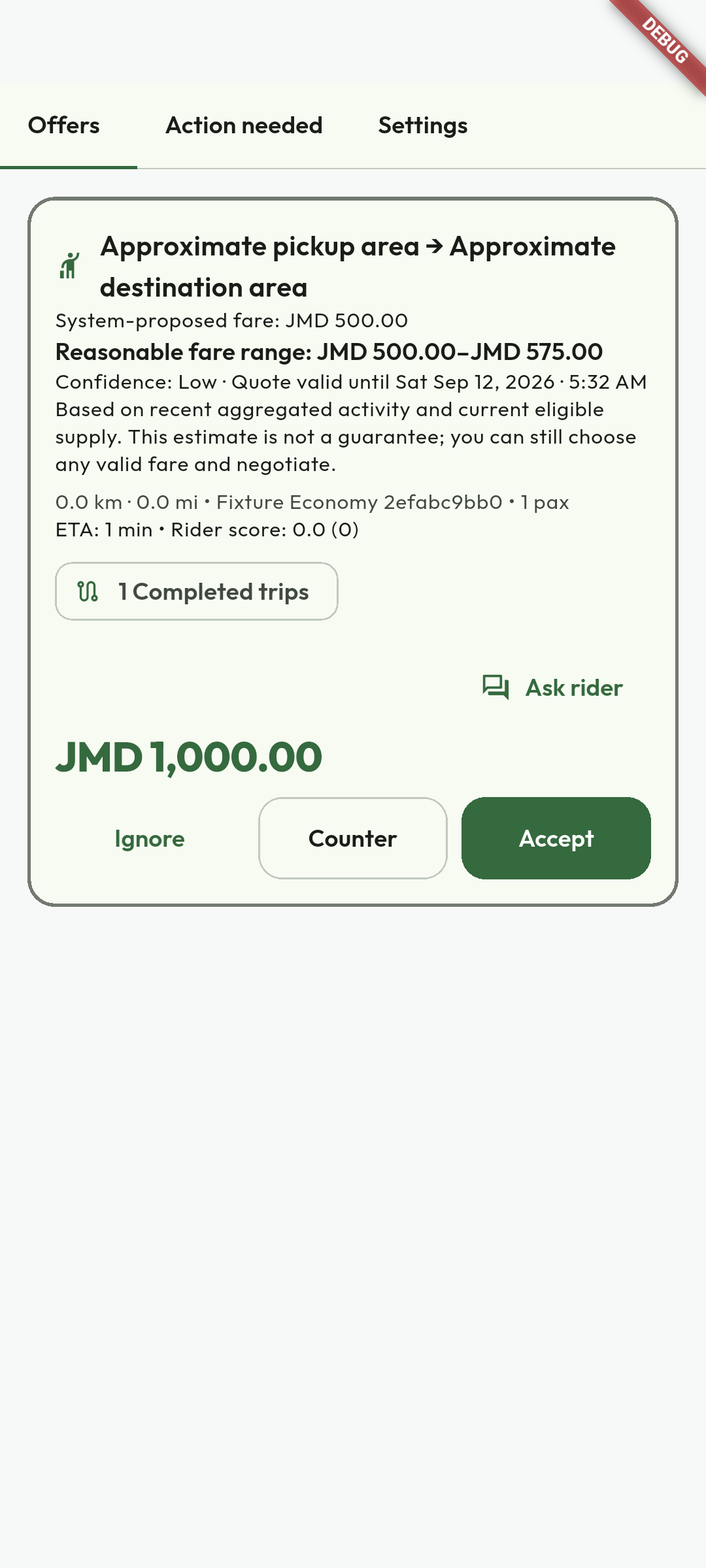
Isolated Flutter demonstration captured 12 September 2026 against the earlier build. Debug banners and fixture names identify test data; this is not evidence of a live journey. No credentials, customer documents or redeemable codes are illustrated. Use the current workflow and recovery guidance when labels differ.
From assignment to journey
Follow the trip lifecycle instructions with these captured examples. Each caption explains the controls actually shown; your available actions depend on account, country and current record state.
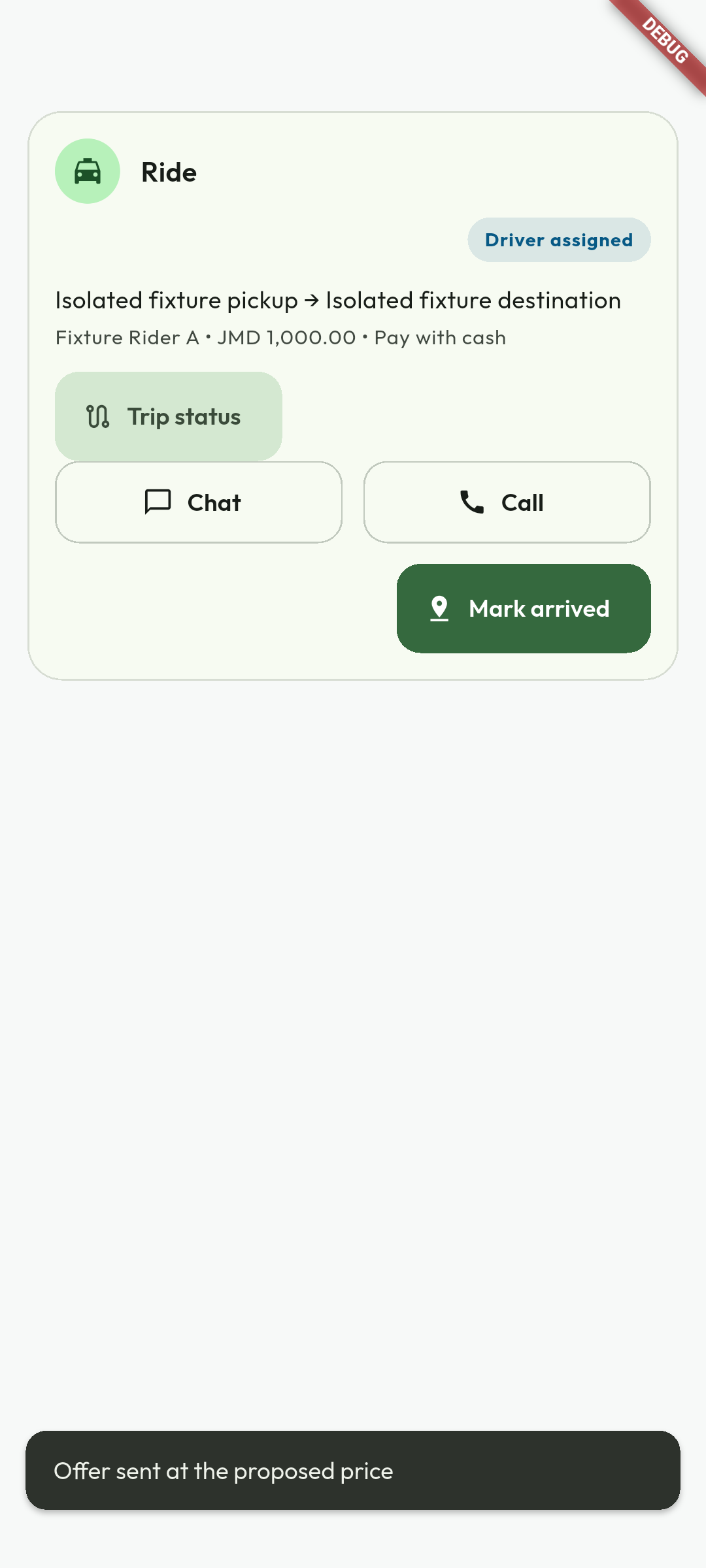
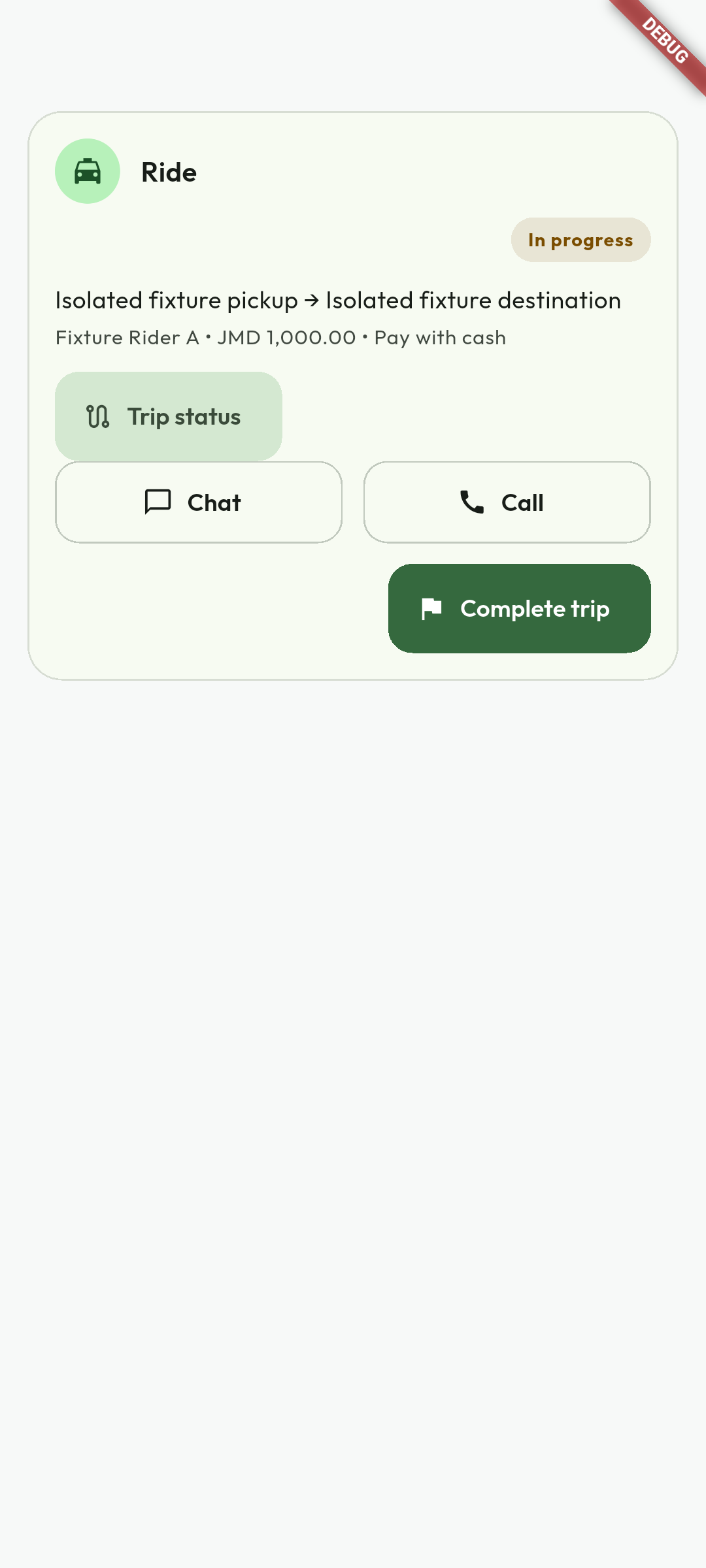
Isolated Flutter demonstration captured 12 September 2026 against the earlier build. Debug banners and fixture names identify test data; this is not evidence of a live journey. No credentials, customer documents or redeemable codes are illustrated. Use the current workflow and recovery guidance when labels differ.
Read a completed trip and receipt
Follow the trip lifecycle instructions with these captured examples. Each caption explains the controls actually shown; your available actions depend on account, country and current record state.
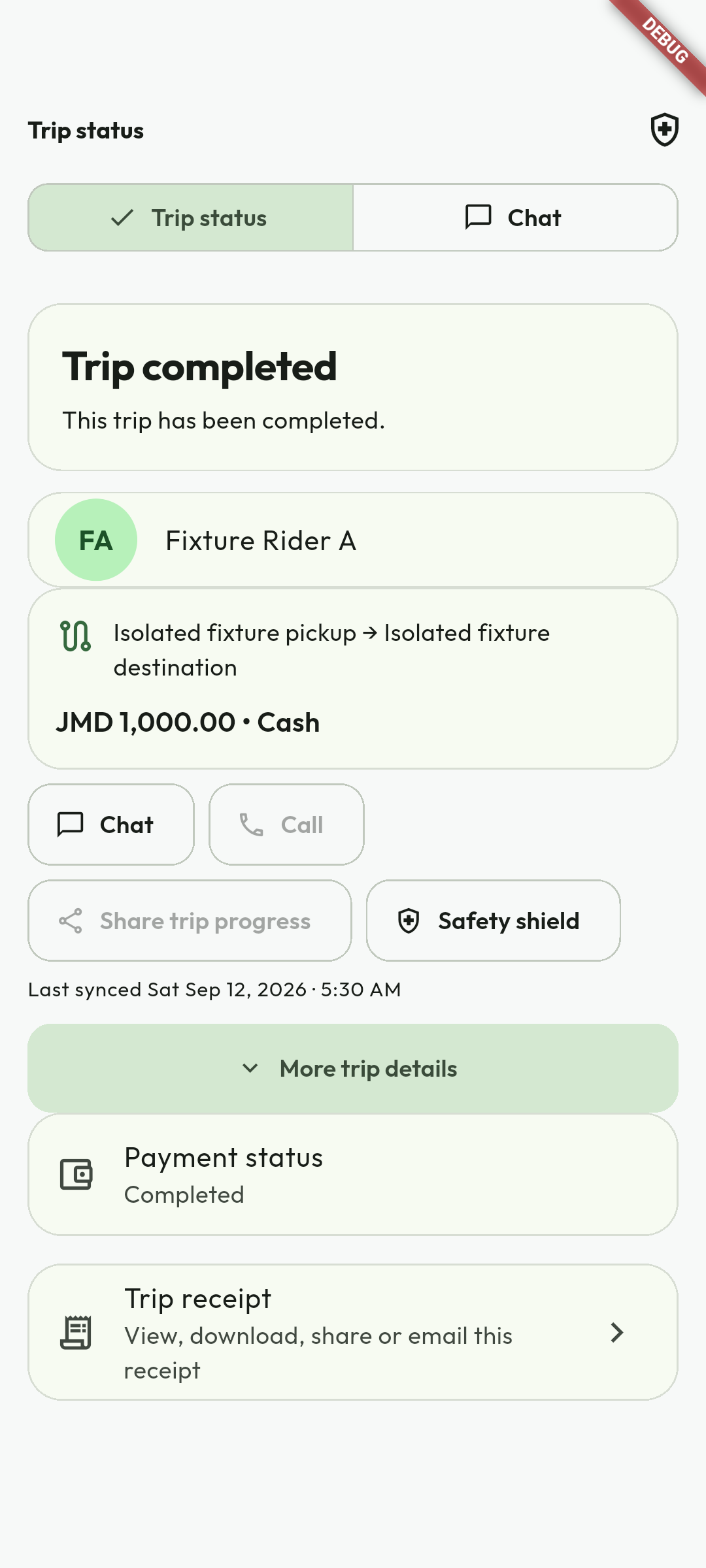
Isolated Flutter demonstration captured 12 September 2026 against the earlier build. Debug banners and fixture names identify test data; this is not evidence of a live journey. No credentials, customer documents or redeemable codes are illustrated. Use the current workflow and recovery guidance when labels differ.
6.1 Communication, timeline, and telemetry
Chat and calls
Only the assigned driver and passenger can read/send active trip chat. Emoji is supported; sent time includes seconds. SignalR delivers live events, while push wakes supported incoming-call UI. Calls include timeout/cancel cleanup to prevent orphaned rooms.
Timeline and telemetry
Milestones are stored with UTC timestamps. Authorized trip replay uses ordered GPS samples for safety investigation, with access controls, audit and retention requirements.
Active-trip background location
From approach/arrival through an active trip, Android and iOS can keep collecting location after the app is backgrounded or the screen is locked. The operating system displays a visible trip/location status. Samples use unique IDs, are queued within a bounded account-bound store when offline, and are uploaded after reconnection. The rider sees Live, last-updated, or temporarily-unavailable freshness rather than a silently frozen marker. Collection stops when the assignment ends.
7. Parcel delivery jobs
- Review sender, recipient, stop sequence, parcel facts, payment method, route and proposed amount.
- Refuse prohibited, unsafe, improperly packaged or materially misdescribed items.
- Review declared contents/value, protection option, handling and delivery window.
- At pickup, capture the required photo and confirm the sender's OTP or QR before taking custody.
- Complete every stop in order. The final completion is blocked while stops remain pending.
- For wallet jobs, escrow was held from the sender at acceptance and releases at completion. For cash jobs, collect the shown amount; KiloDrive does not deduct trip commission.
- At delivery, collect recipient OTP plus required signature/photo proof before completion.
A failed delivery records the attempt and evidence. Follow the next authorized action - redelivery, safe return-to-sender, or support - and preserve the chain-of-custody timeline. Cancelling an assigned-not-started job follows policy and can refund escrow. Complete-vs-cancel transitions are atomic to prevent double settlement.
168. Wallet, earnings, and payouts
Driver ledger
Each completed job provides gross fare, platform fee, tax deduction when applicable, net driver earnings, payout status and timestamp. Use Today, Week and Month filters.
The Driver Toolkit adds destination mode, service areas, scheduled availability, airport/venue queues, earnings goals, hourly/day/week profitability, mileage and fuel/expense tracking, membership usage, demand forecasts, trip-quality analytics, payout projections, and downloadable statements. Forecasts are estimates, not guaranteed earnings or payout dates.
- Open Wallet to review available/held balance and transaction details.
- Open Earnings/Reports for trip-level gross, fees, net payout and settlement status.
- Add a payout method by selecting your country bank first, then a branch belonging to that bank, account type, ISO currency and account number. Confirm the accuracy checkbox before saving. Only masked bank/PayPal descriptors are subsequently displayed.
- Request a cashout within the plan/default minimum, maximum, rolling daily/weekly limits and fraud cooldown.
- Pending cashout funds are held. Admin approval settles; rejection returns the hold.
Cash trips
Cash collected from riders is recorded for reconciliation. KiloDrive does not deduct trip commission; taxes, refunds, chargebacks, cashout costs, and separately disclosed charges remain distinct.
Choose the access level that fits your work
9. Driver membership prices, benefits, and limits
Driver access uses Free, Silver, and Gold membership tiers instead of deducting a percentage commission from an ordinary trip fare. You keep the agreed fare before your own fuel, tax, refund, chargeback, payout, or other separately disclosed costs. A membership provides platform access; it does not guarantee requests, income, or Preferred status.
Free Driver
No subscription price- Up to 8 accepted trips per week
- Core bidding for compliant drivers
- One registered vehicle
- Fair-use, country, and eligibility rules still apply
Silver Driver
Review the current store price- Up to 40 accepted trips per week
- Up to 100 new bids per day
- Three vehicles and three changes per term
- Expanded favorites, block list, wallet, and repeat tools
Gold Driver
Review the current store price- Up to 120 accepted trips per week
- Up to 250 new bids per day
- Five vehicles and ten changes per term
- Highest configured limits and Preferred eligibility
Apple or Google displays and charges the final storefront price for the selected term. Storefront currency, country availability, price, term, benefits, renewal and cancellation terms are authoritative only when shown in Membership immediately before purchase. Do not rely on an old document, screenshot or currency conversion as a purchase quote.
1910. Billing, purchase, renewal, and expiry
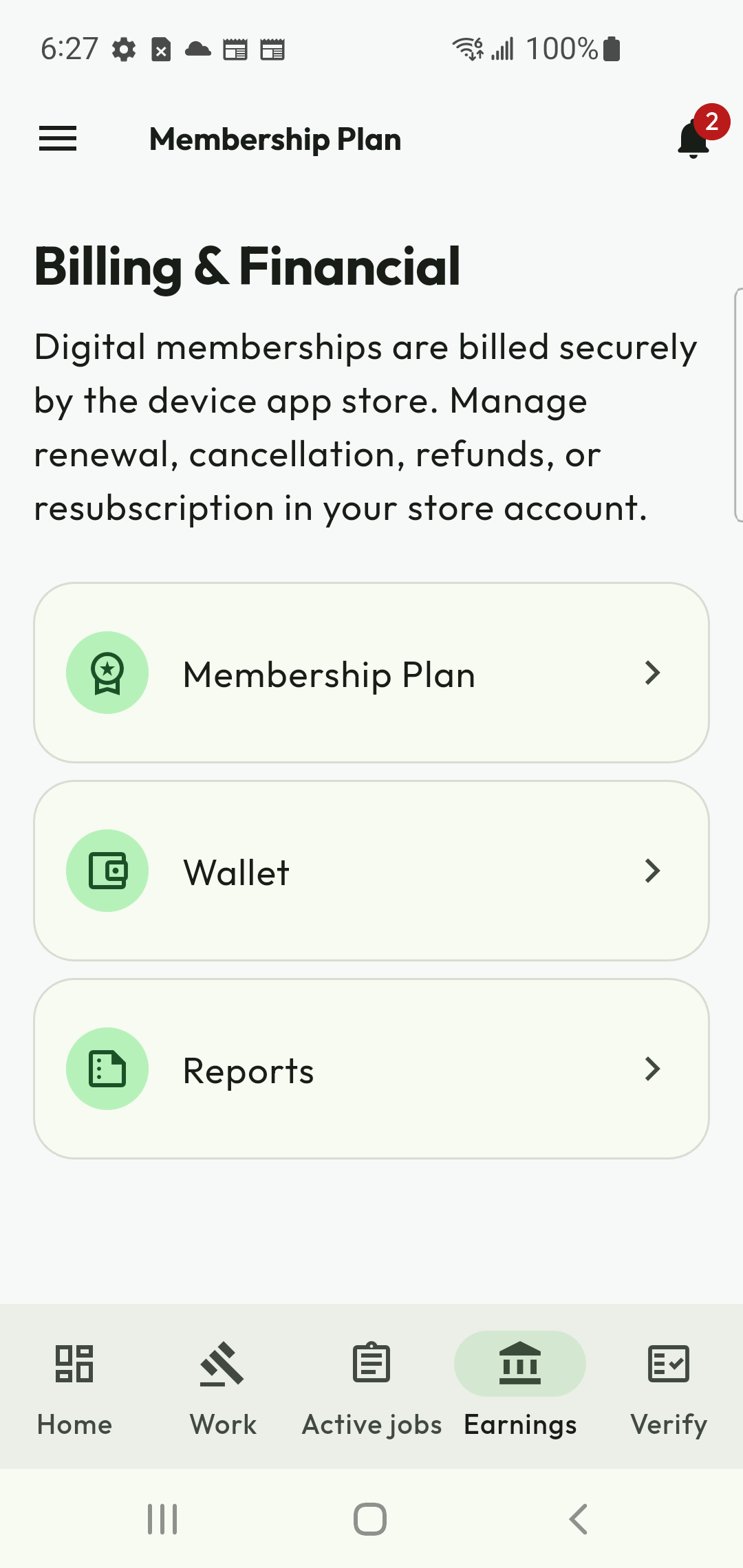
Purchase or change a plan
- Open Membership and review the Current plan, Billing, and Other plans tabs.
- Select a compatible driver tier and a 7-, 30-, or 90-day term.
- Review the store-localized price, limits, start/end dates, automatic-renewal disclosure, Privacy Policy, and Terms of Service.
- In App Store and Google Play builds, buy digital membership only through StoreKit or Google Play Billing. External wallet, voucher, card, PayPal, and bank-transfer membership checkout is hidden.
- Wait for server verification. A Google purchase may briefly show acknowledgement pending; do not buy it again.
- Use Restore Purchases after reinstalling, then manage renewal in the platform subscription settings.
Renewal, grace, and plan changes
Billing distinguishes active, acknowledgement-pending, grace/retry, expired, refunded, revoked, and resubscribe states. An upgrade uses the paid service period for proration. A downgrade takes effect under the store's rules. Refunds, revocations, and chargebacks can end the related entitlement. Never assume an app notification alone proves a purchase; the server-verified entitlement is authoritative.
Cancel or restore safely
Cancellation normally stops automatic renewal and keeps paid access through the server-verified access-through date. Review the provider, renewal price, benefits that remain, policy link and exact effective date before confirming. Native Apple or Google subscriptions may require the platform subscription-management screen. After a verified cancellation, Current plan shows the retained-access period and a receipt appears in Notifications and email. Use Keep membership only when Current plan offers it; otherwise use the provider-management or support action shown by the server.
11. Safety, duty, security, and privacy
Professional safety
- Confirm rider/parcel and destination before movement; never expose protected rider data.
- Observe country-specific online/driving duty windows. Warnings precede thresholds; new assignments can be blocked while emergency completion remains available.
- Respond to unexpected-stop, route-deviation and dual-party check-ins.
- Use emergency escalation and call 119 in Jamaica when immediate police help is needed.
Mutual blocking
Eligible drivers can block riders they have legitimately interacted with, subject to plan and privacy rules. Blocking removes future matching/contact; it is not a substitute for reporting a safety incident.
Data protection
Use Privacy & Safety for block list, export and deletion requests. Location, identity, vehicle, chat and financial records have distinct retention/legal purposes. Do not screenshot or redistribute customer data except for a legitimate report to KiloDrive or authorities.
Account security
Use 2FA, biometrics, recovery codes, verified contact details and session details. Keep OTPs, payout data and keys secret. Report an unknown device/session immediately.
Password-recovery requests always use the same confirmation wording whether or not an account exists. The recovery screen shows code validity and resend timing. Security emails identify the action, request/expiry time, timezone, device, OS, app version and a masked network hint. A completed reset revokes other sessions under account policy; review Session details after recovery.
21–2212. Verification Center and Preferred Driver Program
Verification Center
Upload current ID, proof of address, police record, vehicle registration and vehicle insurance through the private document workflow. Each item is magic-byte validated, stored privately, reviewed, and monitored for expiry where applicable. Rejection notes explain what to replace; never email identity files.
Preferred Driver Program
Only an active Gold-plan driver may apply. Eligibility requires at least 1,000 ratings, 100 completed trips and full verification: ID, proof of address, police record, valid registration and valid insurance. Approval is reviewed, not automatic. Approved drivers receive a Preferred badge, an entitlement to two KiloDrive branded shirts, and access to rider requests restricted to Preferred Drivers. Suspension or expired evidence removes exclusive access until resolved.
Reputation is more than one star average
KiloDrive records structured feedback for cleanliness, punctuality, communication, and safe driving, plus verified trip count, long-term reliability, and document status. Drivers can also provide structured rider feedback. Reviews are released and moderated under anti-retaliation, duplicate, conflict, and manipulation controls. Optional third-party review screenshots are evidence for an administrator-set starting count/score - they are never auto-approved.
RideCheck and emergency response
RideCheck compares live telemetry with the planned route and detects sustained material deviation or unexpected stops. A route-change alert asks the rider whether they are safe and is escalated if it goes unanswered; other safety events may request a separate driver check-in. Never handle the rider's phone or pressure a response. For immediate danger, stop only when safe, use the active-trip Emergency button and call the local authority (119 in Jamaica). Live Trip Sharing may expose the assigned vehicle, route and safety stops to a rider-authorized trusted contact; accesses expire and are audited.
Data duties
Driver identity, police, location, chat and financial data are separated by purpose and access role, encrypted in transit and stored under retention controls. Do not retain rider data off-platform. KiloDrive redacts secrets/payment data from logs and audits verification, safety and administrative actions.
22A–22B13. Calculator tools
| Calculator | Driver use |
|---|---|
| Fare | Compare distance/time/toll-based suggestion with a proposed bid. |
| Fuel | Estimate journey fuel volume and cost. |
| Mileage | Estimate operating distance in km and miles. |
| Jamaica toll | Vehicle class, entry/exit, return trip, plazas and historic/current rates. |
| Vehicle loan | Deposit, principal, interest, term, payment and amortization. |
- Open Calculator Tools in mobile or portal.
- Enter valid non-negative inputs and review units/currency.
- Save the result where available; saved calculations are audit logged.
- Export a Letter-size professional PDF with logo, calculator title and generation date.
Outputs are estimates; verify lender, toll operator, tax and vehicle costs independently.
23Estimate driver earnings
Follow the calculator tools instructions with these captured examples. Each caption explains the controls actually shown; your available actions depend on account, country and current record state.
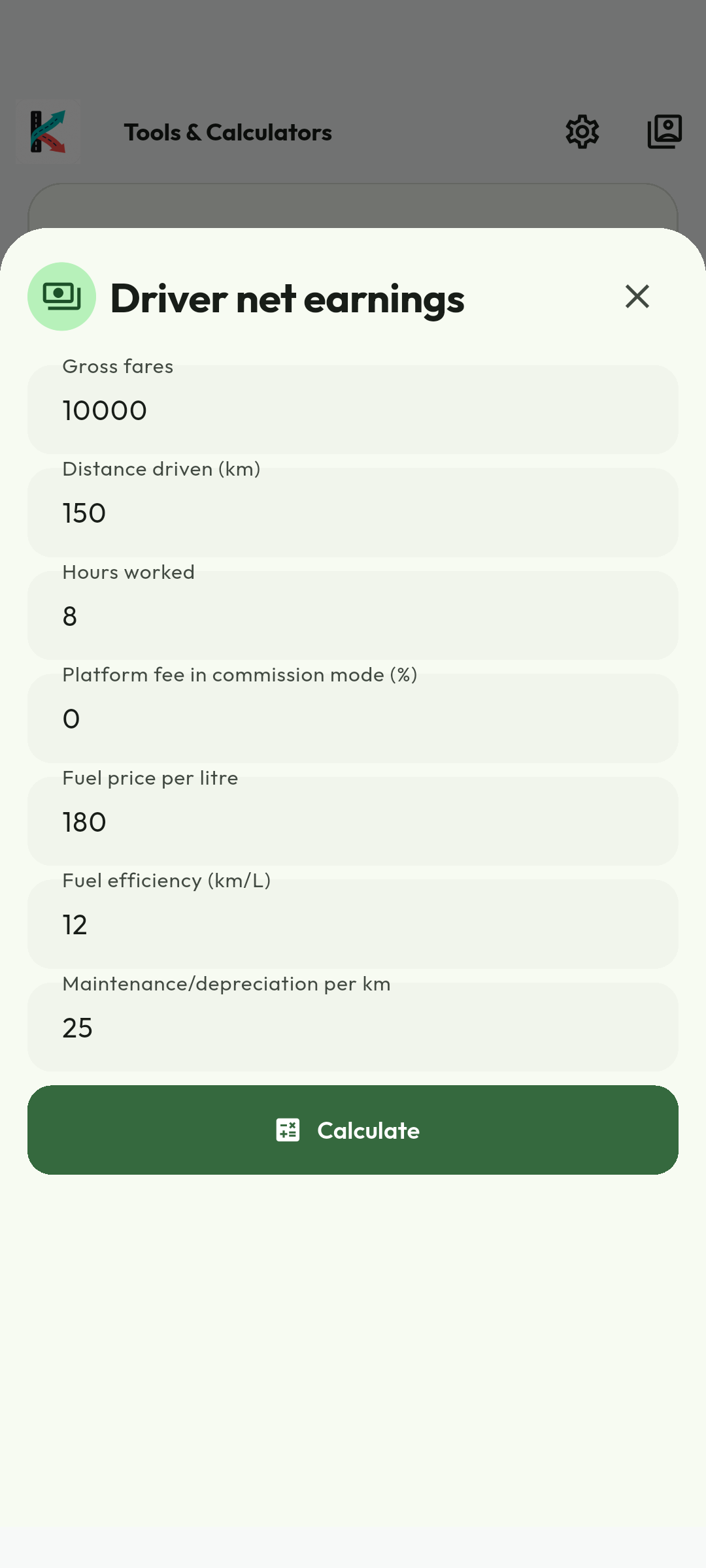
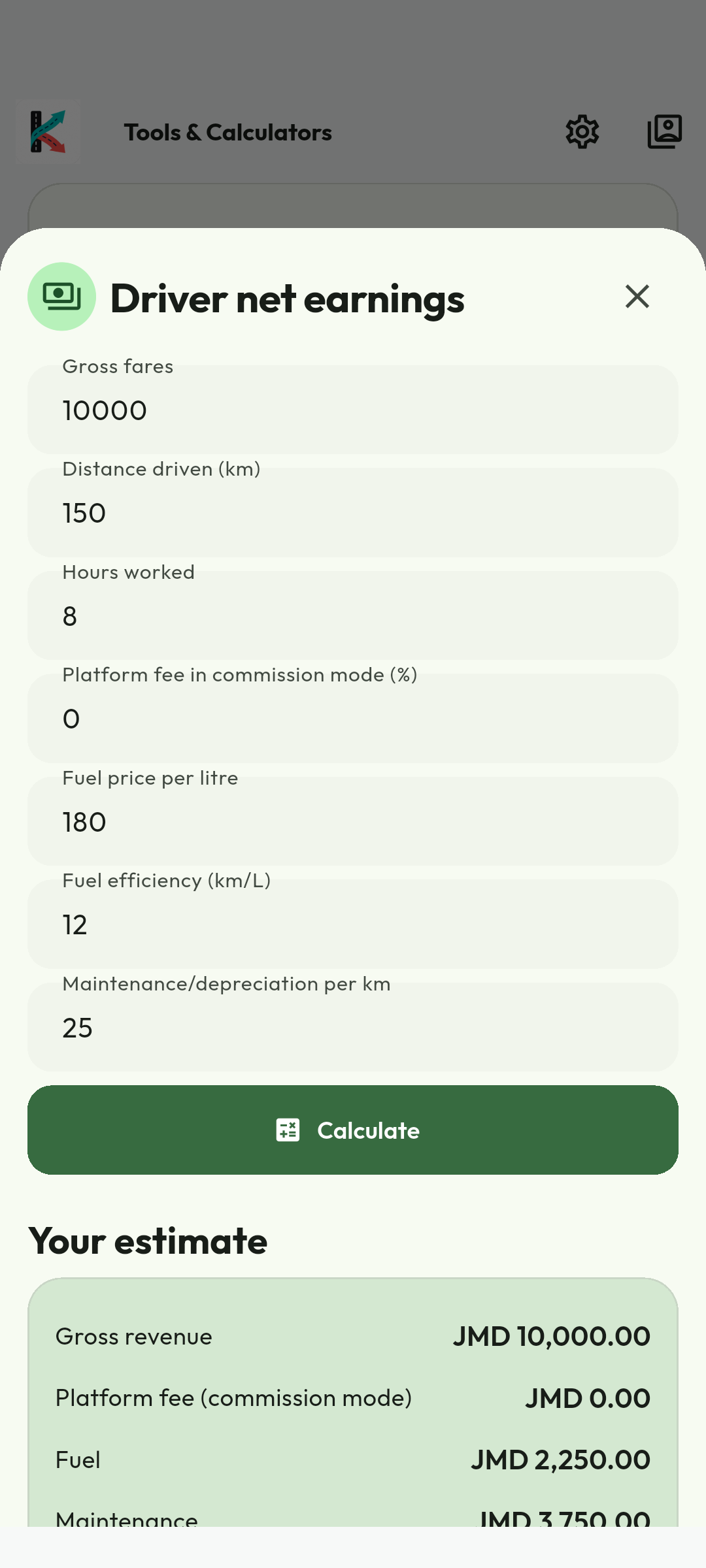
Android calculator demonstration captured 4 September 2026. Sample amounts, dates and labels are historical; check current prices, policies and the live interface. No credentials, customer documents or redeemable codes are illustrated. Use the current workflow and recovery guidance when labels differ.
Understand full vehicle operating cost
Follow the calculator tools instructions with these captured examples. Each caption explains the controls actually shown; your available actions depend on account, country and current record state.
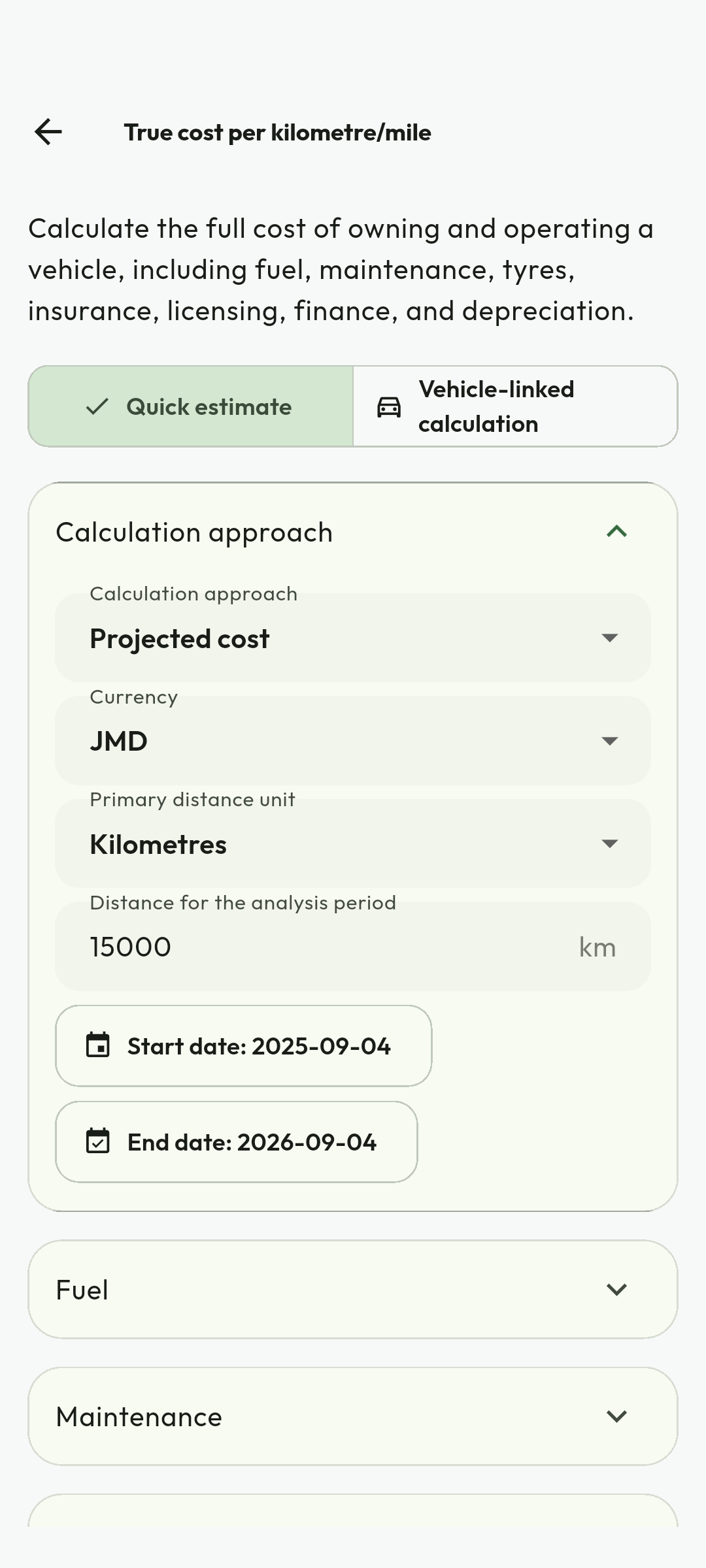
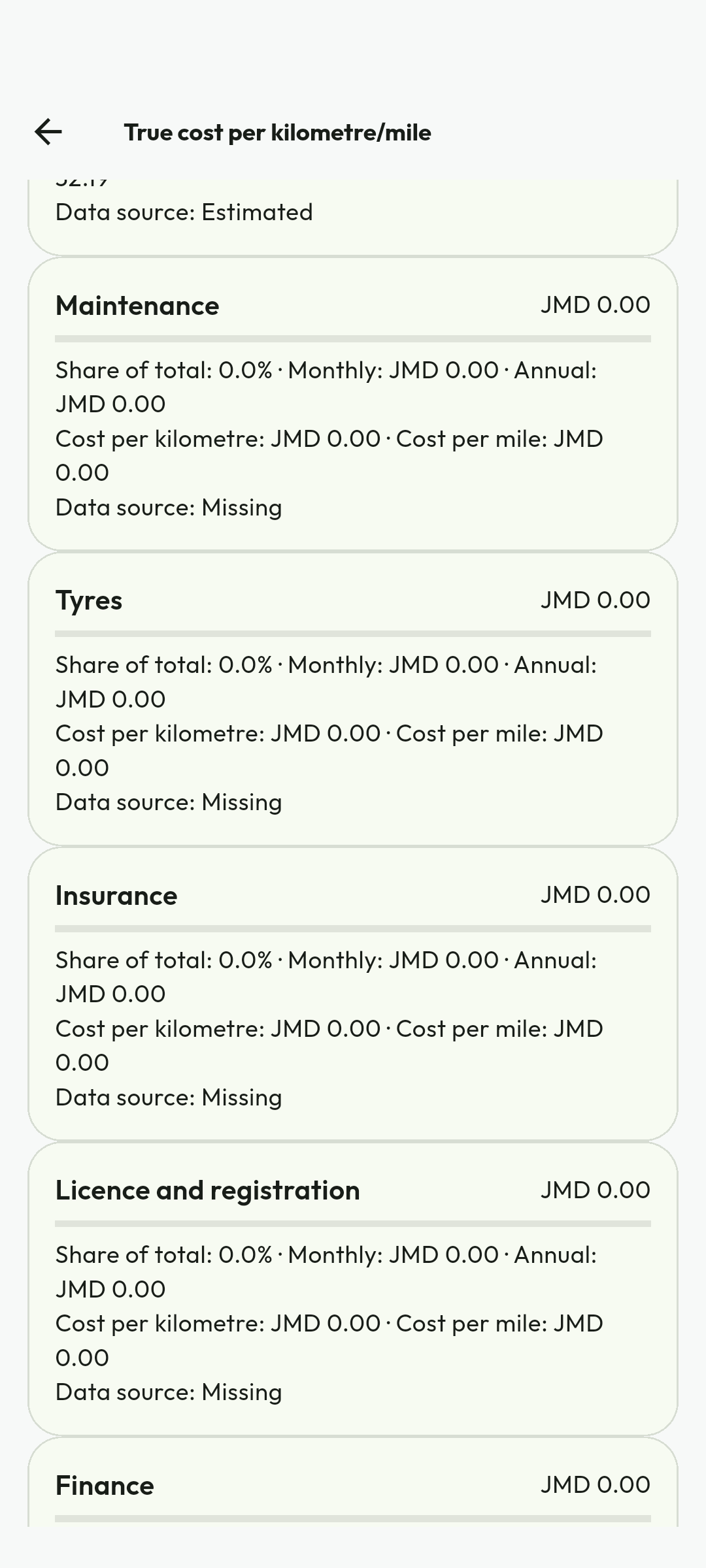
Android calculator demonstration captured 4 September 2026. Sample amounts, dates and labels are historical; check current prices, policies and the live interface. No credentials, customer documents or redeemable codes are illustrated. Use the current workflow and recovery guidance when labels differ.
Estimate mileage-related tax savings
Follow the calculator tools instructions with these captured examples. Each caption explains the controls actually shown; your available actions depend on account, country and current record state.
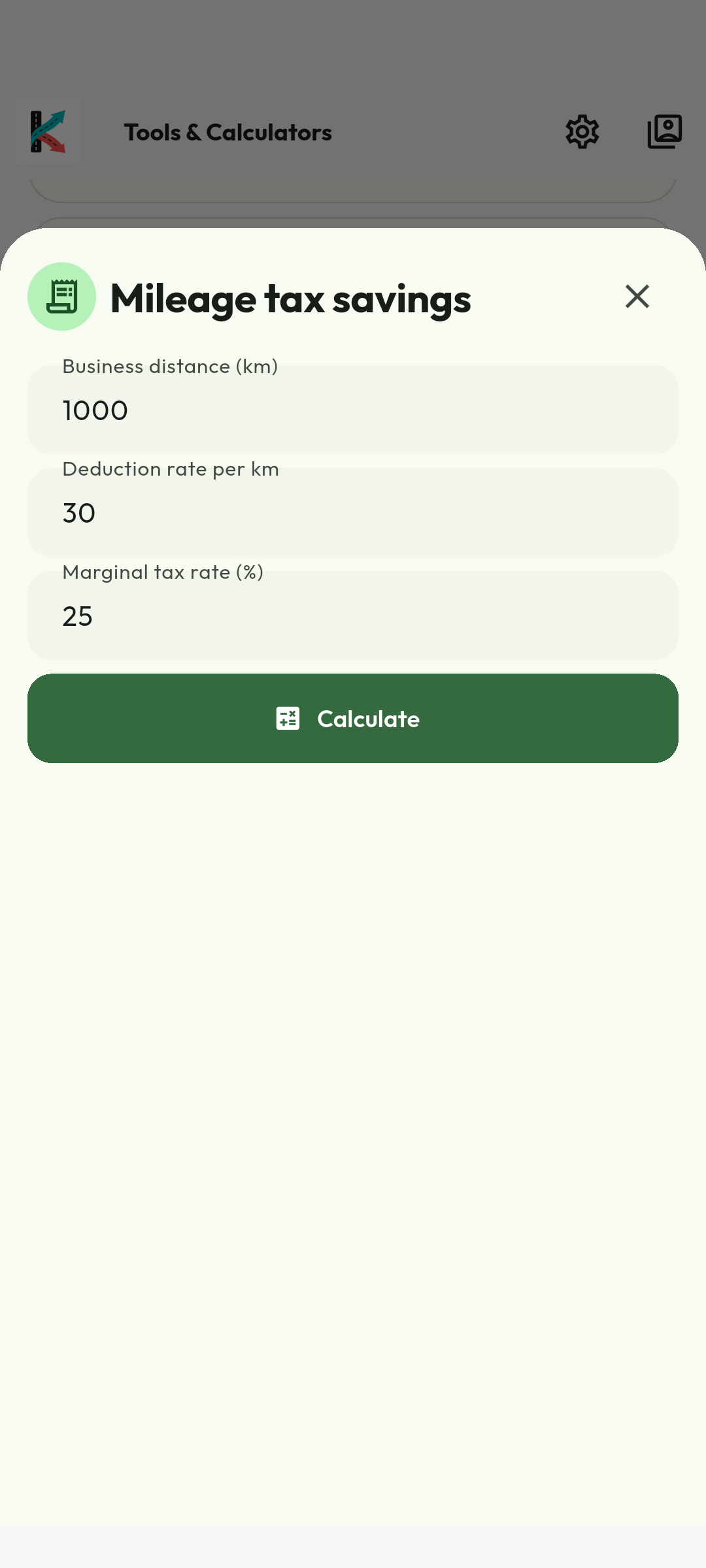
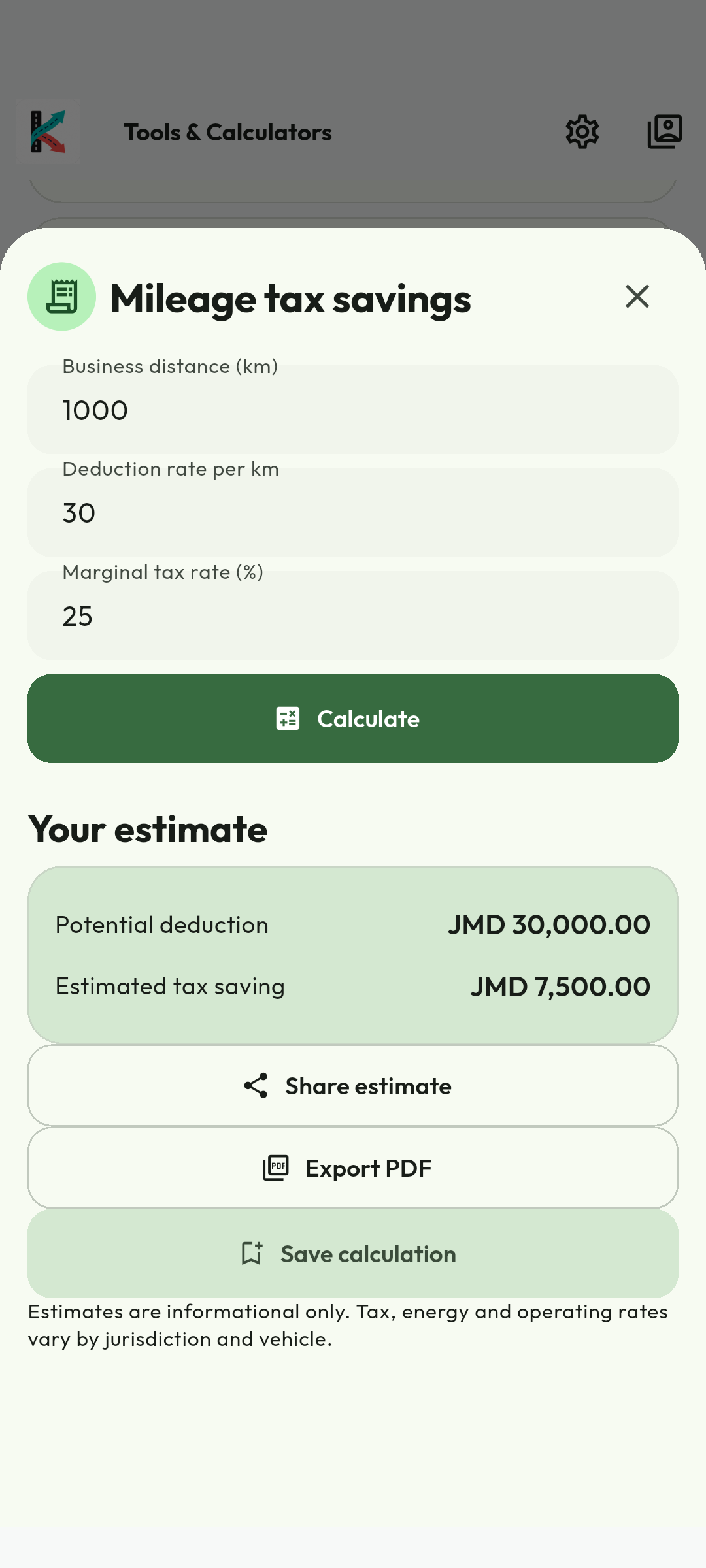
Android calculator demonstration captured 4 September 2026. Sample amounts, dates and labels are historical; check current prices, policies and the live interface. No credentials, customer documents or redeemable codes are illustrated. Use the current workflow and recovery guidance when labels differ.
Compare electric and petrol operating costs
Follow the calculator tools instructions with these captured examples. Each caption explains the controls actually shown; your available actions depend on account, country and current record state.
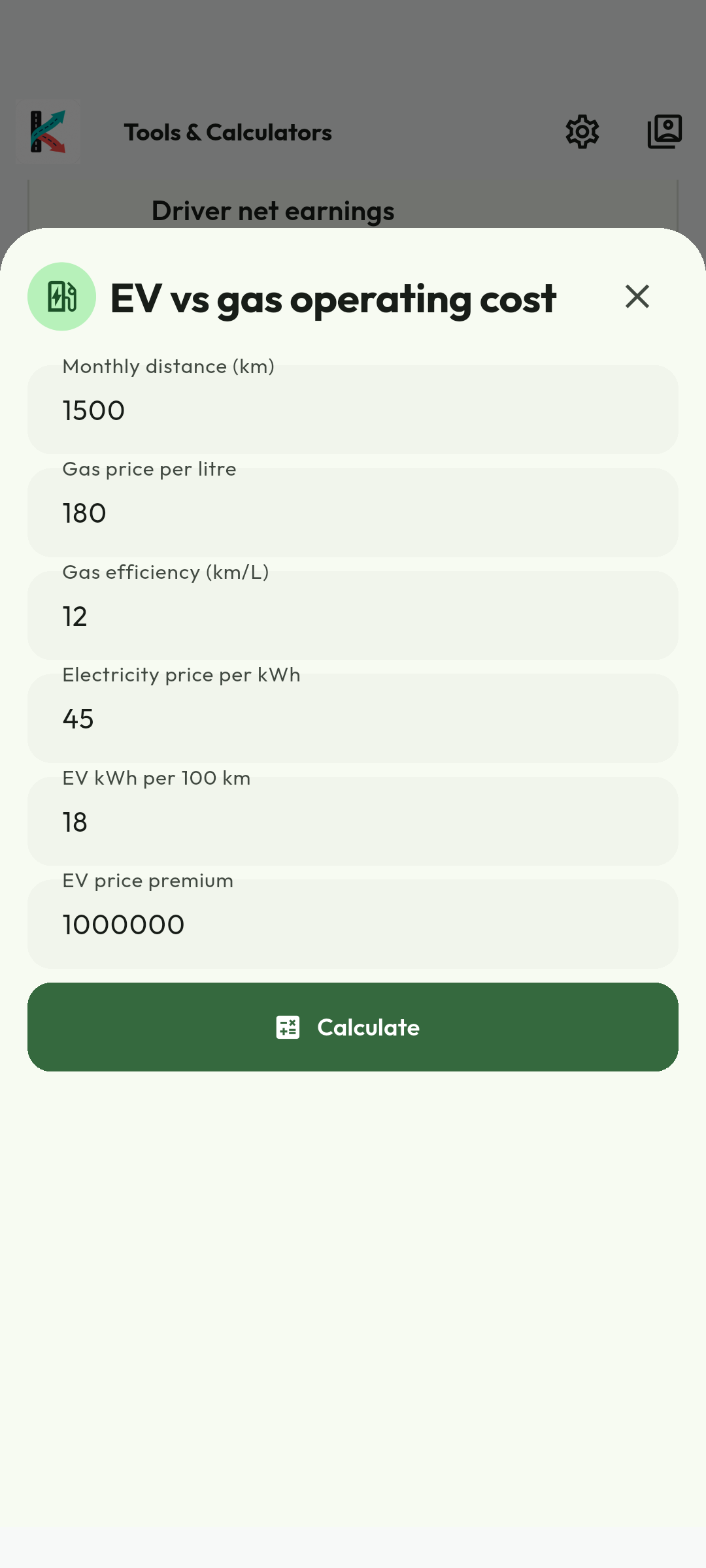
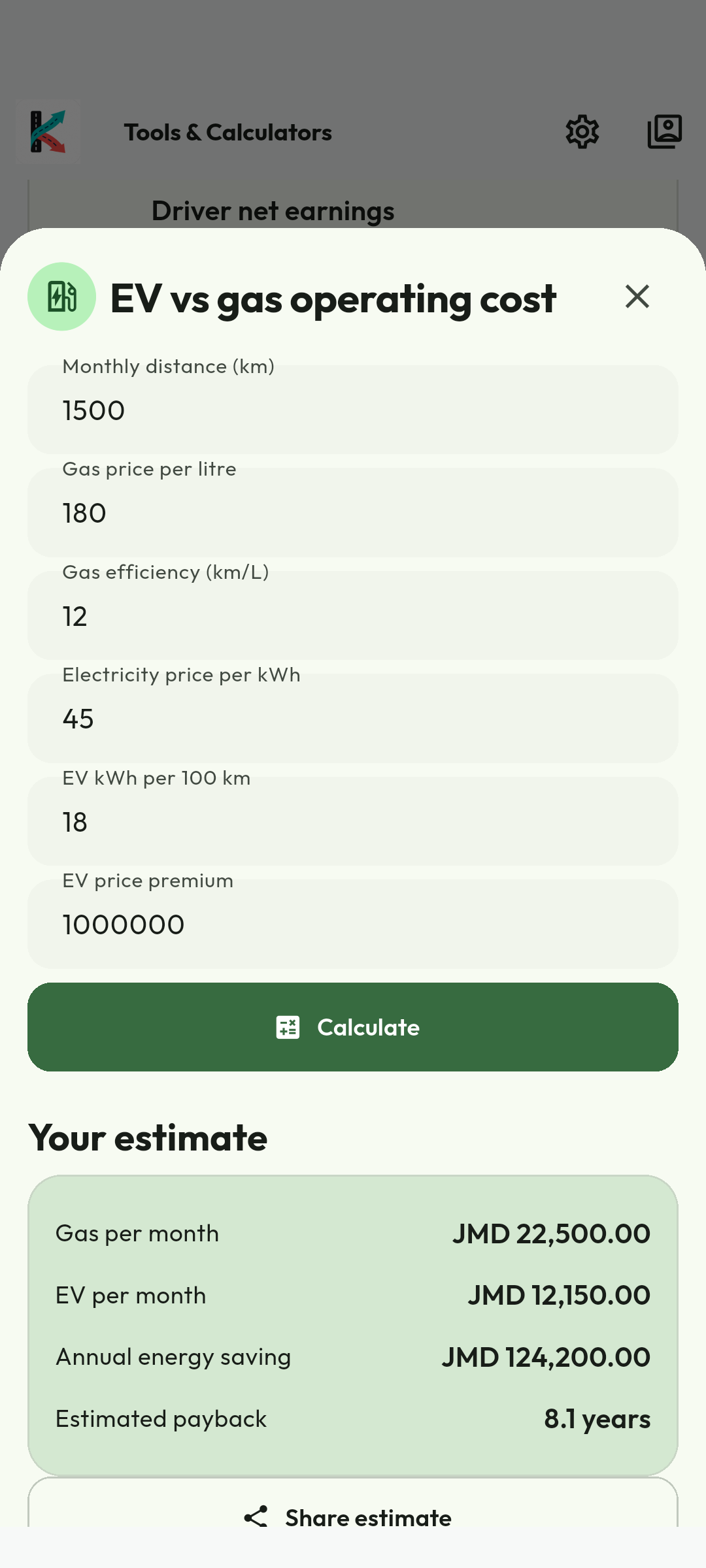
Android calculator demonstration captured 4 September 2026. Sample amounts, dates and labels are historical; check current prices, policies and the live interface. No credentials, customer documents or redeemable codes are illustrated. Use the current workflow and recovery guidance when labels differ.
14. Use the Driver portal
- Open https://my.kilodrive.com and verify HTTPS.
- Sign in and complete 2FA. The menu is role-aware.
- Use Driver dashboard, trips, earnings, vehicle, reports, Billing, settings and support.
- Open a trip for timeline/route details. Authorized replay access depends on role and investigation policy.
- Use Billing to review membership selection, plan expiry, payment methods and history.
- Use Notifications for durable trip, bid, chat, wallet, membership, support and security history. Push permission or sound affects the delivery channel, not the in-app record.
- Download earnings, trip or wallet reports as PDF/Excel.
- Sign out on shared devices.
15. Support and incident response
- For immediate danger, stop safely, use active-job safety tools, and call the local emergency service.
- For an app problem, record time, trip/delivery ID, screen and exact error without collecting private passenger data.
- Check connection/API status, permissions, active country and verification status.
- Select the affected trip, payment, document, delivery, rental, or account item.
- Choose the structured issue type, explain it briefly, and attach only relevant evidence.
- For payment uncertainty, quote the payment/correlation ID and wait for reconciliation—do not repeat the payout or settlement.
- For vehicle/document corrections, use the dedicated verification workflow rather than a general profile edit.
Reply inside the case so the secure message and attachment history remains together. Closing a case does not erase evidence that KiloDrive must retain for safety, finance, fraud, dispute, or legal purposes.
25Available support options
| Option | Use it for | What to provide |
|---|---|---|
| In-app Help & Support | FAQs, troubleshooting, and authenticated ticket creation. | Category, concise description, affected reference, time, and safe attachment. |
| Portal Support | Ticket history, detailed follow-up, reports, billing, verification, and organization issues. | Sign in at https://my.kilodrive.com and quote the exact transaction, trip, booking, vehicle, or ticket reference. |
| General assistance when account access is unavailable. | Email [email protected] from the registered address where possible; never send passwords, OTPs, recovery codes, full cards, or unredacted banking credentials. | |
| Safety toolkit | Active-trip safety check-ins, trusted contacts, live sharing, and incident context. | Use during the active service and preserve the displayed trip/vehicle information. |
| Emergency services | Immediate threats, injury, crime, fire, collision, or kidnapping. | Call the local authority directly—119 in Jamaica—and state location, people involved, vehicle/plate, and direction of travel. |
Severity and response
Choose the category that reflects actual impact. Duplicate tickets slow investigation. Money, safety, privacy, identity, and account-compromise cases receive specialized handling; response time depends on urgency, evidence, provider dependencies, and jurisdiction.
Appendix A. Negotiated bidding and ranking
Standard rides are never automatically awarded by the matching worker. The rider proposes a fare; ranked drivers accept or counter; the rider selects the winner. The API commits the ride and durable job together and returns immediately.
- Valkey GEO search starts at 3 km.
- You are rejected before routing if offline/inactive, stale, busy on an assigned/arrived/in-progress trip, missing a compatible active vehicle, mutually blocked, missing child-seat capacity, not pet eligible, not WAV eligible, or not airport eligible.
- Nearest-K Haversine truncation limits OSRM/traffic routing.
- The lower-is-better score weights traffic ETA 50%, distance 20%, acceptance penalty 15% and rating penalty 15%. The best 5–10 receive a short exclusive wave; a Valkey atomic lock prevents competing offers.
- Submit Accept or counter-price; a push is not an assignment. Only rider acceptance creates the trip.
Hungarian/Jonker–Volgenant: these optimize a multi-ride/multi-driver bipartite matrix globally. Hungarian is typically O(n³); Jonker–Volgenant is an optimized augmenting-path family. Standard bidding does not use them to override marketplace choice. Future Speed Match requires separate consent, price, cancellation, timeout, audit and fallback rules.
A1–A3Appendix B. Money, disputes, and account status
Hosted PSP pages protect raw card data. Wallet holds are not cashout-able. Cashouts pass plan, velocity, cooldown and fraud checks and retry only after a known result. Gross fare, platform fee, applicable tax deduction, tips and net earnings are separate ledger concepts; drivers remain responsible for applicable tax advice and filings.
Refunds/rejections are linked reversals, never deleted history. Chargebacks can produce negative balances and payout restriction. Safety, document, fraud, legal or payment review can cool off/suspend an account; termination preserves valid liabilities and legally retained records.
Use 2FA and biometric lock; never copy rider data off-platform. KiloDrive uses TLS, private storage, tenant/country isolation, audit and log redaction. Verified law-enforcement requests are scoped and disclosed minimally; emergency life/safety access is documented.
B1–B3Appendix C. Breakdown, towing, collision, and injury
- Stop safely, activate hazards and call emergency services for injury, fire, crime, obstruction or danger (119 in Jamaica).
- Account for occupants; do not diagnose or move an injured person except under professional instruction or immediate hazard.
- Inform the rider, use active-trip safety, stop accepting jobs and do not falsely complete.
- When safe, capture location, plate, damage, road/weather, other-party/insurer details, witnesses and police report. Do not admit liability.
- Request approved roadside help. Keep the vehicle offline until repaired/reverified.
- Verify towing authority/operator/destination and custody. Never immobilize a moving vehicle.
- For injury, obtain care, notify insurer, preserve evidence and use the restricted case channel for medical data.
Insurers/authorities determine fault, coverage and compensation.
C1–C4Appendix D. Driver membership purchase, usage, and renewal
Billing & Membership shows usage fillers against bids, accepted rides, vehicles, vehicle changes, favorites, and other plan limits. Select a 1-week, 1-month, or 3-month term and review the local-currency quote.
- In an App Store or Google Play build, purchase a digital membership only through the native store checkout. External membership methods are hidden. Other approved channels may be offered outside those store builds where policy and local law permit.
- Hosted and bank payments remain pending until verified or approved.
- Keep the congratulations receipt showing plan, cost, effective date, expiry date, and benefits.
- Push, email, and SMS reminders are sent two days before expiry.
Payments are idempotent and financial events use balanced integer-minor-unit debit/credit journals.
D1-D2Release 1.6
The professional-driver operating model
KiloDrive is designed as a professional toolkit, not merely a feed of ride requests. Readiness, marketplace choices, trip execution, earnings, reputation, evidence, and recovery are connected by explicit state and country policy.
Resumable twelve-step onboarding
A new driver completes a non-skippable, resumable journey covering identity and profile photo; driver's licence details and evidence; proof of address and background evidence where required; membership; verified contact review; display and security preferences; vehicle; registration; insurance; fitness; optional third-party reputation evidence; business preferences such as hourly rate, unit, and display currency; and final legal acknowledgement. The final submission creates one onboarding review case containing the staged evidence, instead of asking administrators to review abandoned partial journeys.
- Each page exposes Back, Save for later, Next, settings, and sign out without opening the rest of the app prematurely.
- Completed or pending evidence is not resubmitted accidentally. A compliant existing vehicle satisfies the matching vehicle step.
- Jamaica licence validation uses the active database-driven rule. Country switching reloads the relevant licence and plate guidance rather than retaining a stale formatter.
- External Uber, Lyft, or inDrive screenshots are optional review evidence. They never change the starting score automatically; an authorized administrator reviews the source and sets an auditable starting count and rating.
- Proof of address or background evidence may use only the country-configured deferment. Expiry can lock operational access until the missing requirement is resolved.
Release 1.6
Readiness and safer offer decisions
Readiness is one policy, evaluated twice
Before a driver sees or submits an offer, and again inside the locked acceptance transaction, the server checks online lease, fresh permitted location, duty state, active assignments, licence, identity, approved primary vehicle, registration, insurance, fitness, capability, requested trust level, membership, limits, and country readiness. Passing the first gate does not permanently waive the second. A system administrator may use a documented override, but every overridden aspect, reason, actor, time, country, and resulting restriction remains visible and audited.
Offers designed for safe decisions
When stationary or moving slowly, the rich offer view can show route, stops, distance, pickup, destination, request type, suggested range, rider offer, payment method, trust needs, and negotiation history. Above the configured movement threshold, KiloDrive suppresses nonessential controls and presents a voice-readable summary with 48-dp actions and one-tap acceptance of the suggested amount. Text entry is the default counter-offer control; a precision slider is optional. Never interact with the phone while driving unless the vehicle is safely stopped and local law permits it.
R2Release 1.6
Trip execution, reliability, and professional tools
- Receive. A privacy-bounded dispatch event is matched to schedule, service area, destination mode, vehicle capability, trust, availability, and fresh telemetry.
- Decide. Accept the rider amount, submit an exact counter-offer, or decline. Withdrawals and replacements update the actionable bid count rather than increasing a historical counter.
- Commit. Acceptance snapshots the selected vehicle, compliance version, fare provenance, currency, route, stops, and payment choice.
- Approach. The rider sees live driver movement and freshness. The driver's native location session begins from a visible trip state and displays the platform-required indicator or persistent notification.
- Confirm. Mark Arrived only when appropriate. Where enabled, validate the short-lived single-use pickup PIN or QR before Start. Attempts are rate-limited and never logged as plaintext.
- Execute. Follow ordered stops and recorded waiting states; use chat or calls only in allowed trip states. Enter sends a composed message, while duplicate retries reuse a client message identifier.
- Close. Completion uses validated telemetry or route distance, posts the timeline and audit event, creates the receipt and ledger result, stops tracking, and opens mutual feedback.
Background reliability and airport/venue queues
Android uses a narrowly scoped native location foreground service only for approaching, arrived, and in-progress work. iOS uses a visible Core Location background session for the same server-confirmed states. Samples are placed in a bounded, account-bound queue and sent with idempotent identifiers after reconnection. Queue-zone membership is a server-authoritative lease renewed by the active availability telemetry service, not by keeping a screen open. It expires on stale telemetry, offline status, zone exit, assignment, logout, or lease timeout.
R3Release 1.6
Membership, business tools, trust, and support
Membership, billing, and the business toolkit
- Current plan, Billing, and Other plans are swipeable typed tabs. Core plan data remains visible if an optional store request fails.
- Paid purchase is enabled only when the active API plan/term mapping exactly matches the native Apple or Google product, base plan or offer, currency, and localized store price. Missing mapping means Term unavailable; no price is invented.
- Purchase, renewal, grace, acknowledgement-pending, refund, revocation, restoration, upgrade, and downgrade retain the purchased term, paid-price source, payment, entitlement, and journal evidence.
- The toolkit covers destination mode, preferred areas, scheduled availability, airport and venue queues, hourly rate, earnings goals, mileage, fuel and expenses, profitability, membership utilization, trip quality, demand guidance, statements, and payout projections.
Trust, communication, and support
Reputation includes verified trip count, punctuality, communication, cleanliness, safe-driving feedback, recency, sample context, imported starting evidence, and document badges. Blind-review and anti-retaliation rules protect both parties. Family or business supervisors join only a separately scoped conversation when consent and policy allow; they do not silently receive the private rider-driver chat. Support cases identify the trip, payment, document, safety event, or membership concerned and move through Received, Reviewing, Waiting for information, and Resolved with evidence, SLA, owner, next action, closure, reopen, and escalation records.
Complete identity and vehicle evidence
The driver wizard is the only allowed post-registration destination until the required onboarding journey is submitted. Drafts must survive camera, gallery, cropper, legal-reader, background/resume and restart transitions.
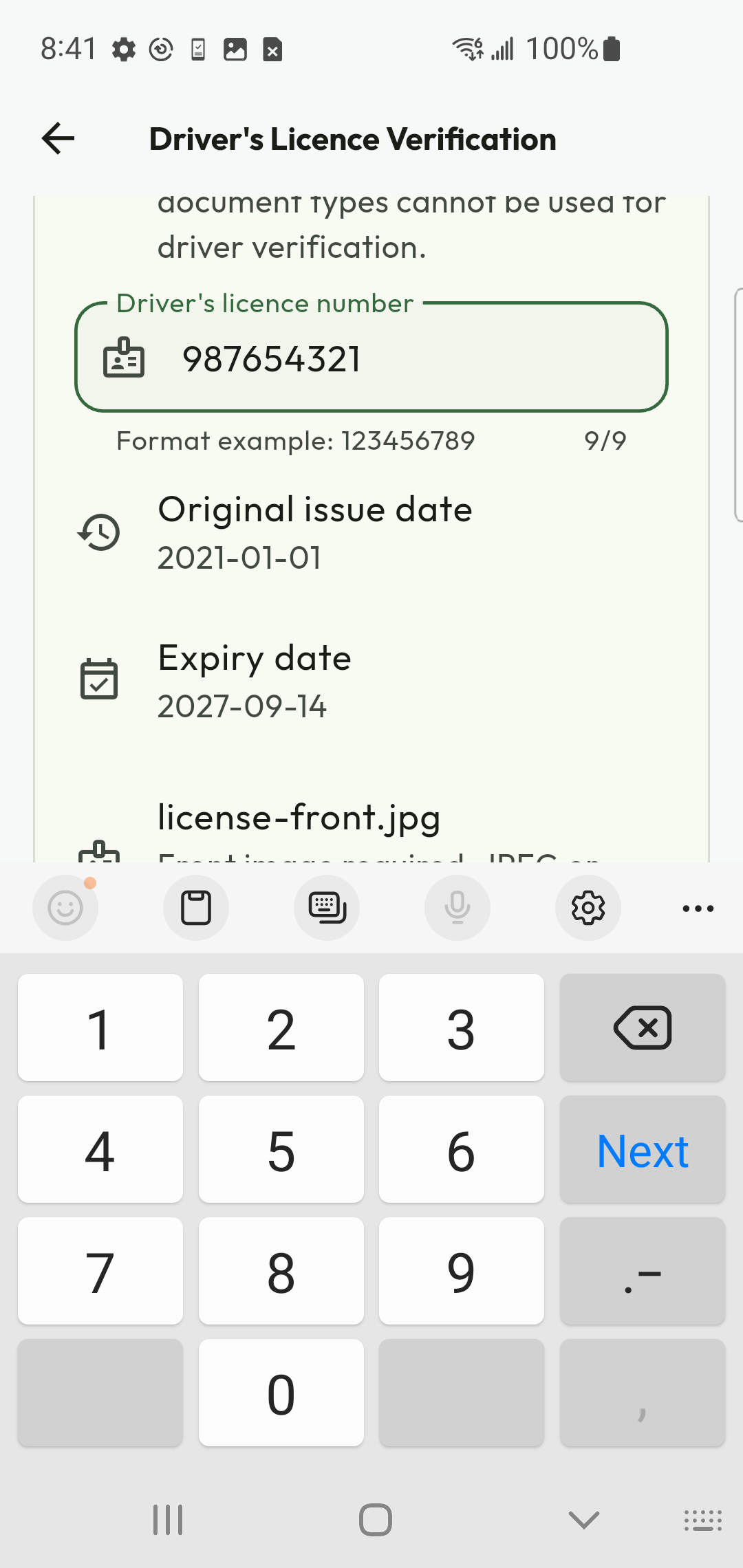
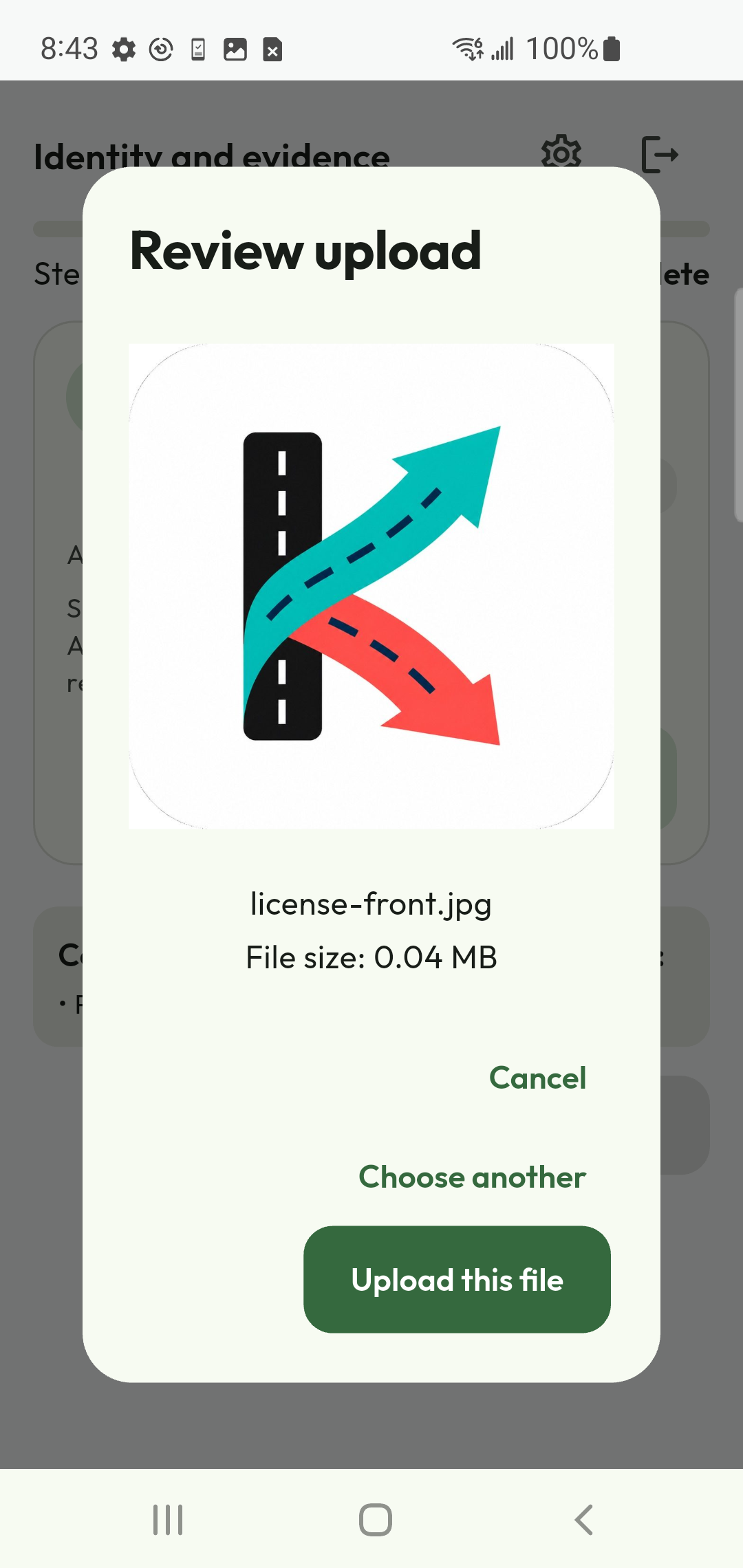
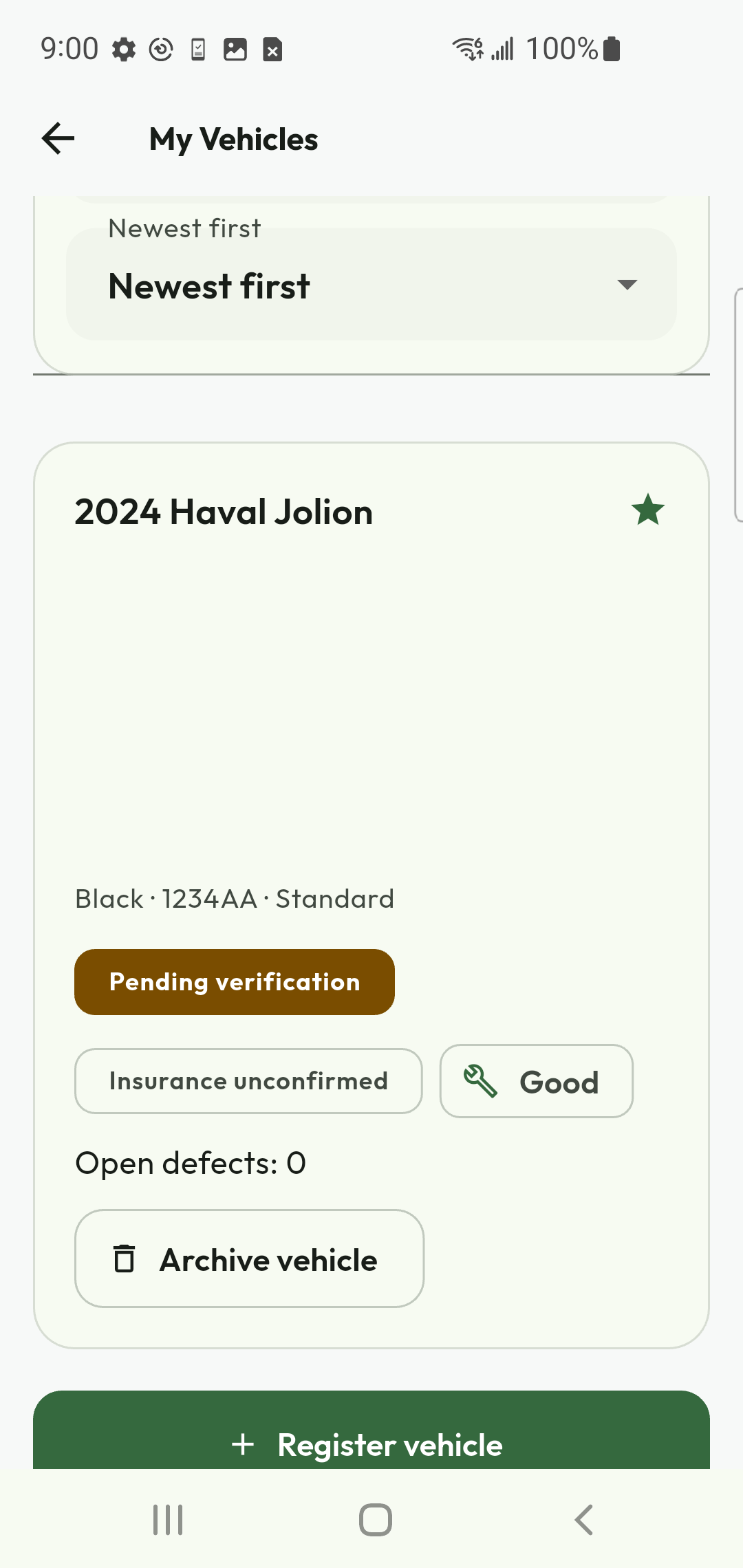
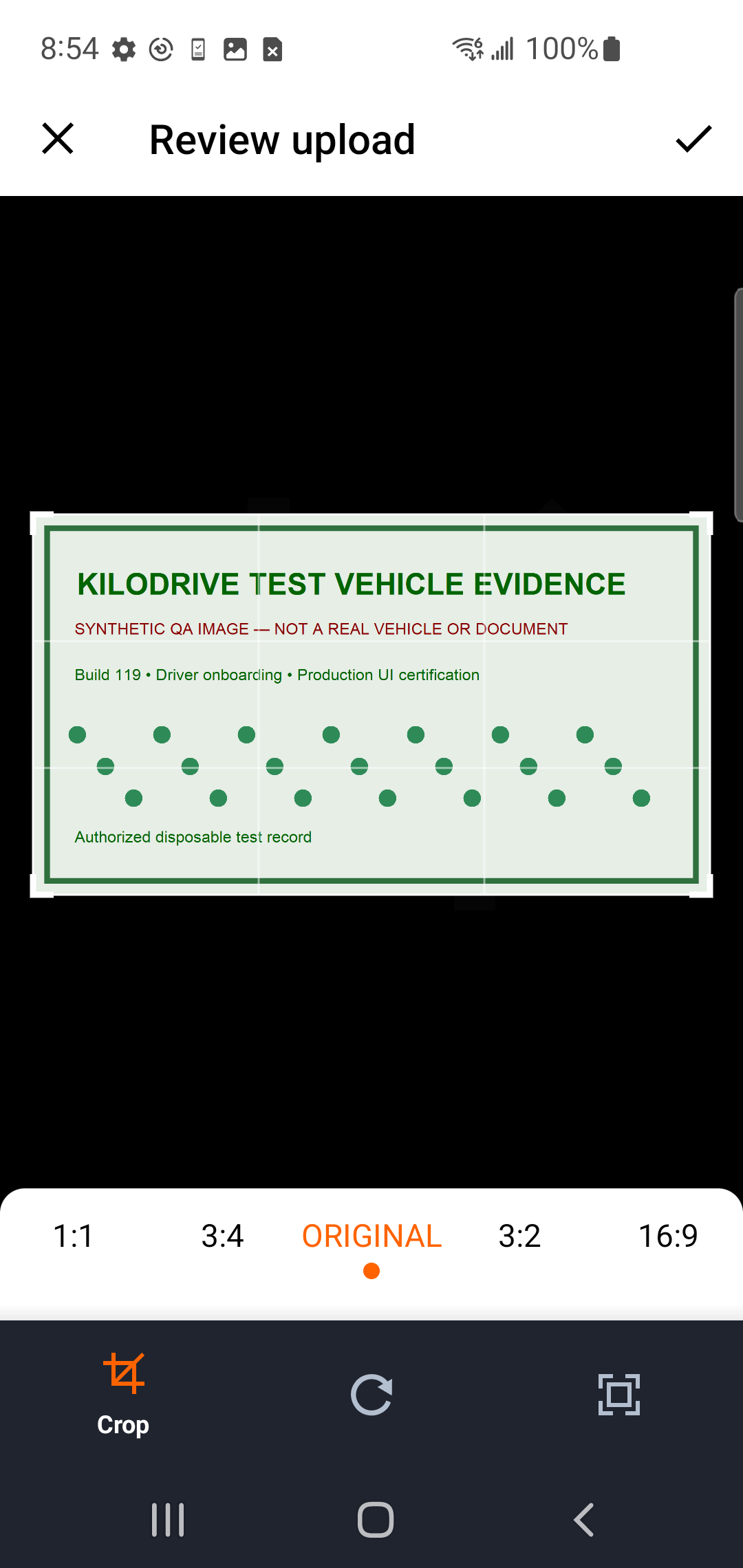
Physical Android captures from the build 120 certification run. Example licence, vehicle and account data are test fixtures, not reusable evidence.
Driver workflow 1Finish legal, membership, and submission steps
Review the vehicle registration, insurance and fitness items independently. Accept the current mandatory legal documents in the wizard, choose the available membership/trial path, acknowledge required safety/training terms and submit onboarding.
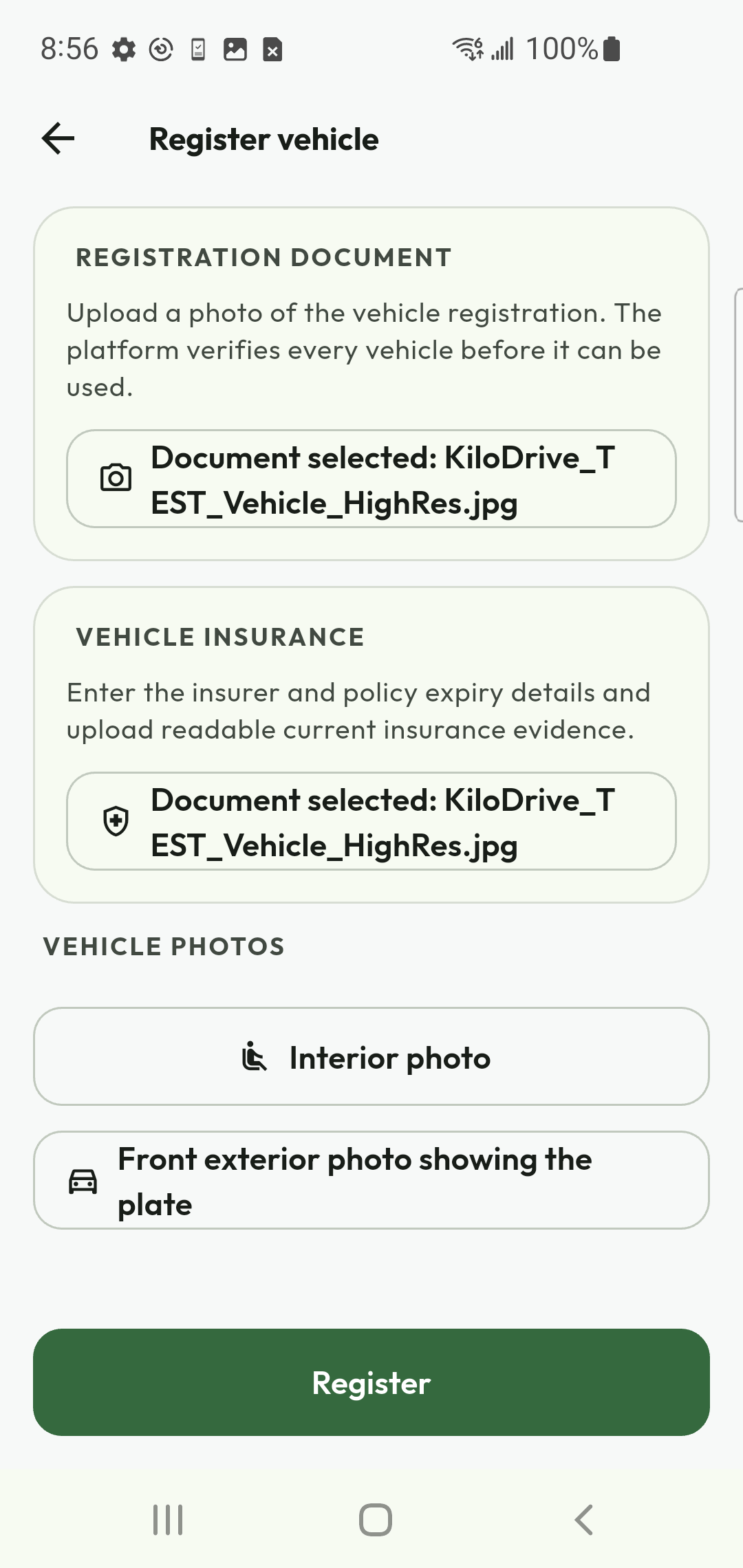
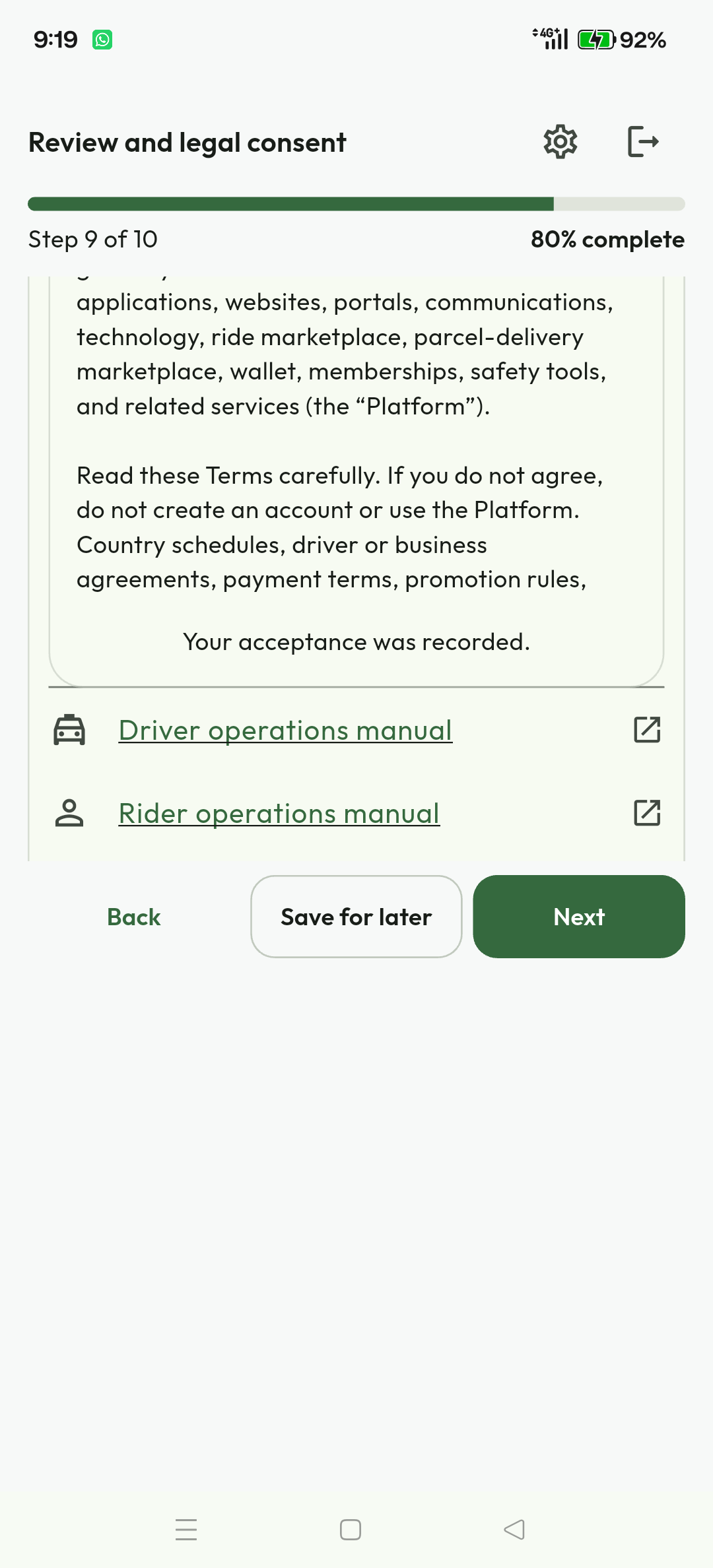
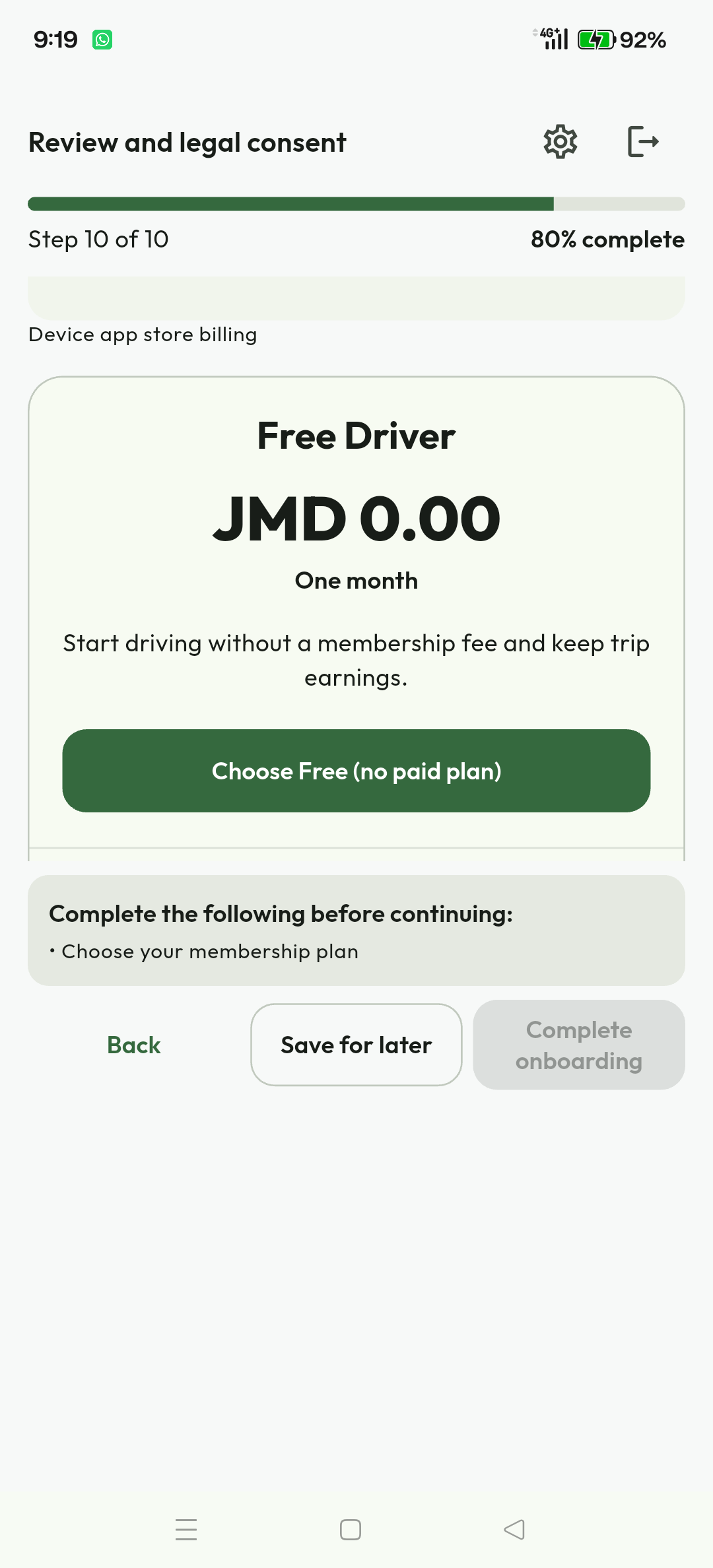
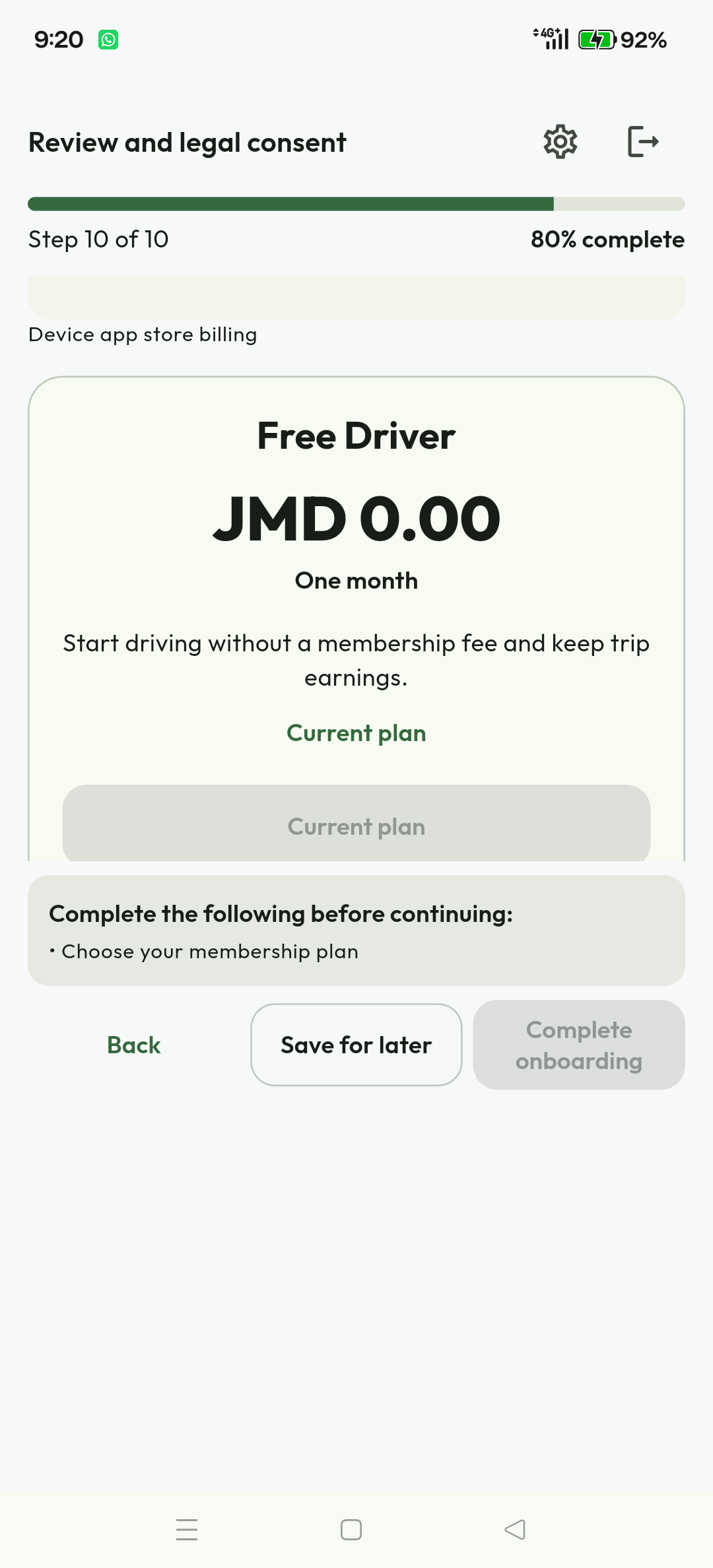
Expected result. The driver remains in the restricted pending experience until the server-derived readiness checklist is satisfied. Bidding is not permitted merely because the wizard reached its last page.
Driver workflow 2Go online and review a mapped request
After approval, open the Work destination. Some captures and releases still name its screen Bidding Halls. Resolve every My Status item before going online. Choose Near Me, Island-wide or Deliveries only when the matching country, membership, vehicle and safety policy permits it.
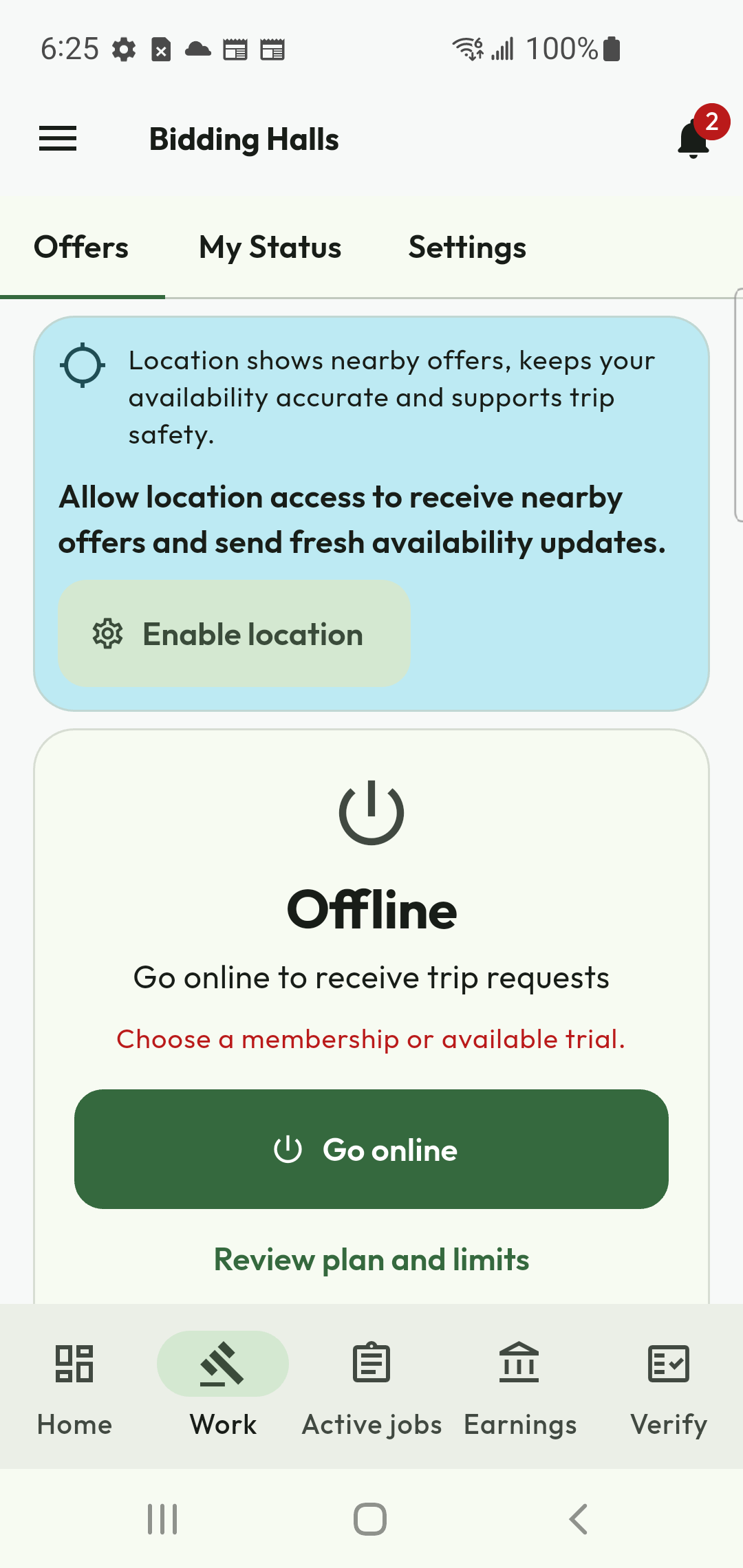
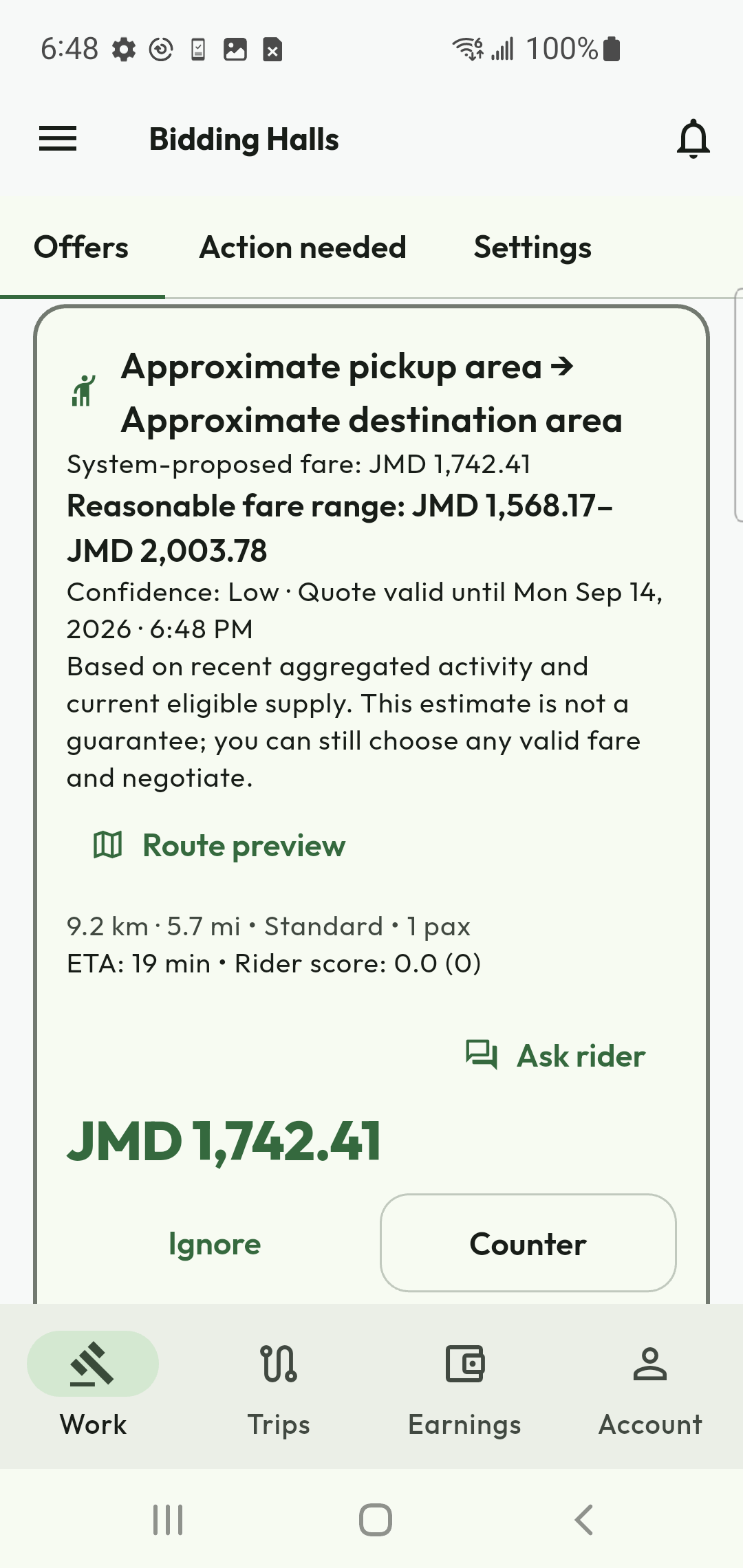
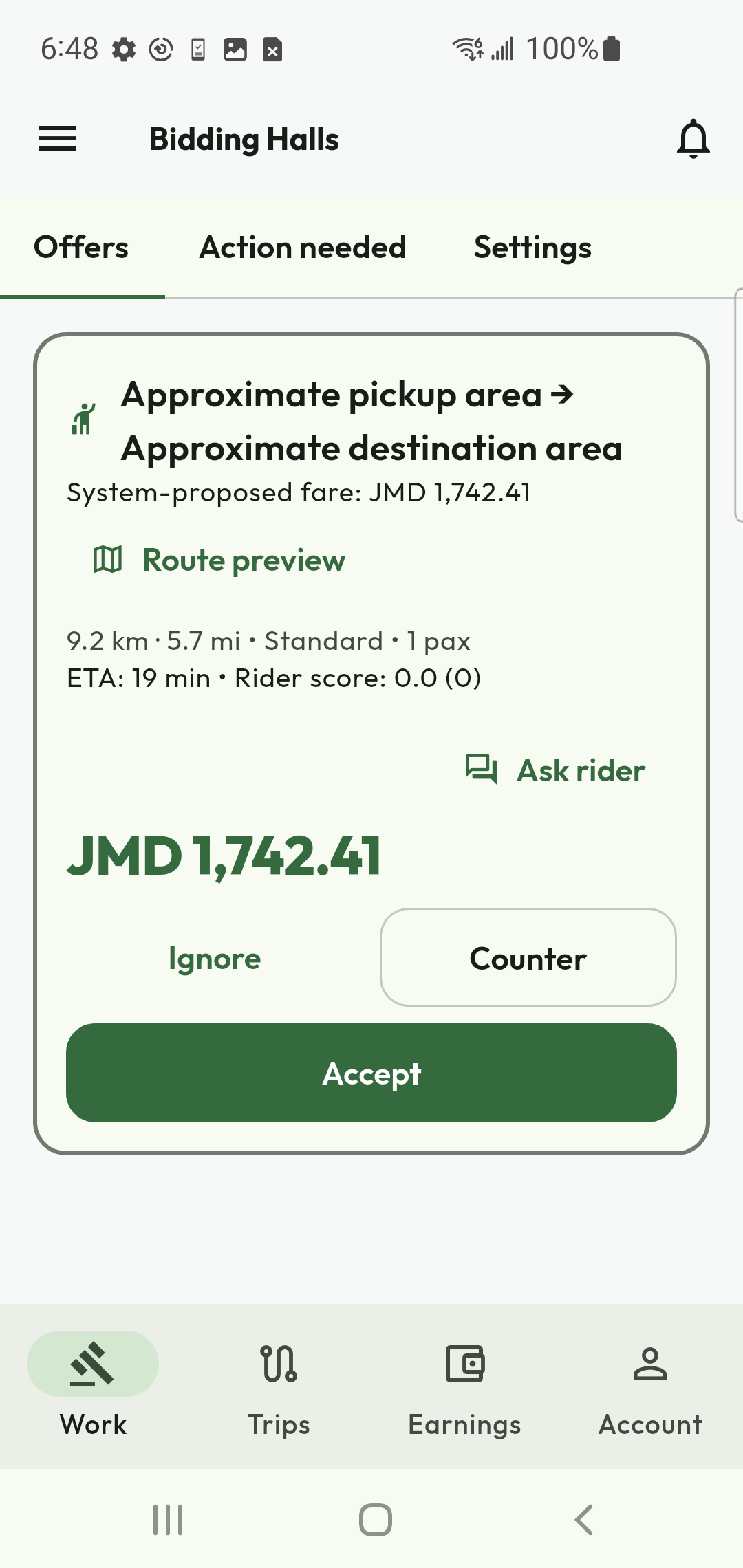
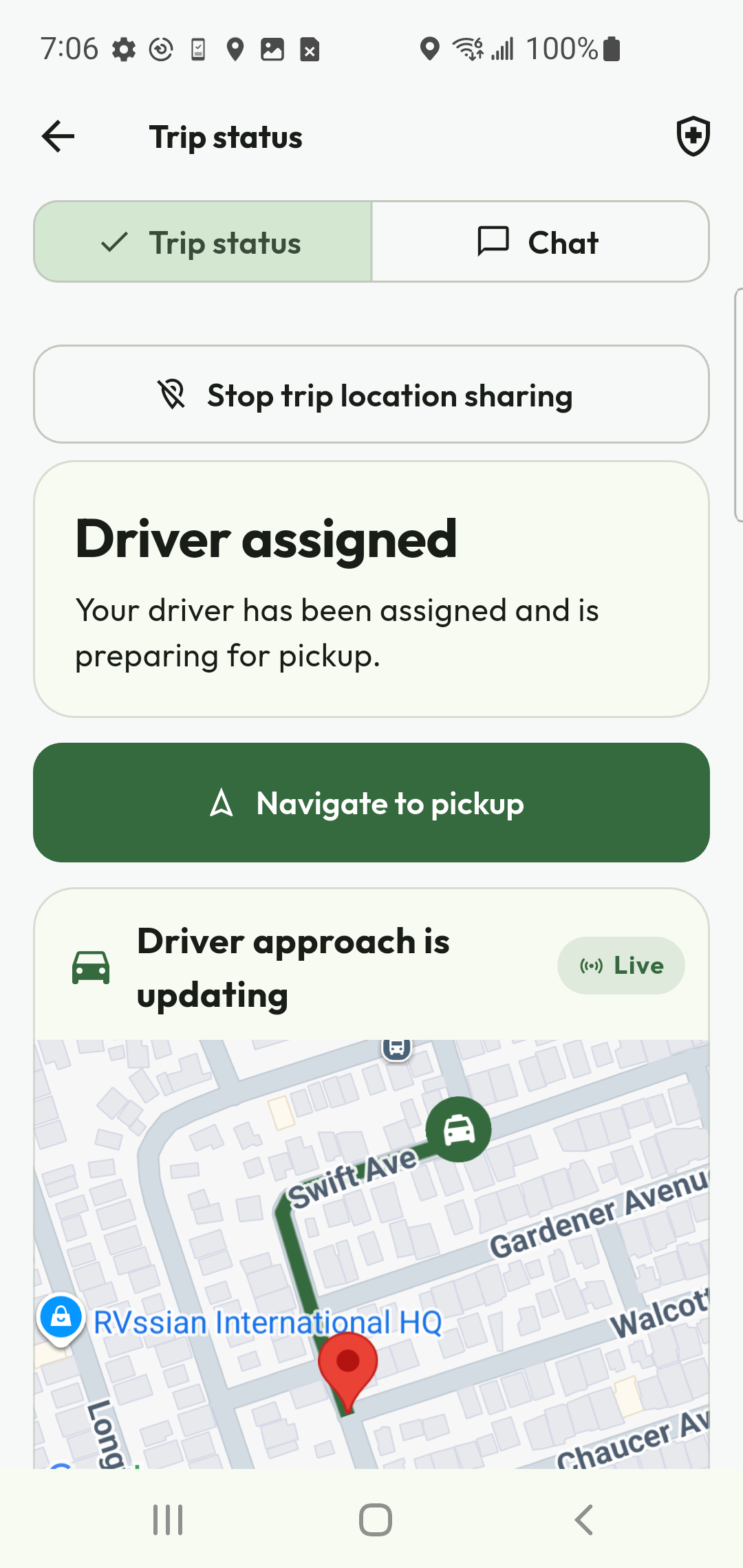
Expected result. Acceptance creates one assignment atomically. A stale or already-assigned response requires refresh; never treat a disabled card or old notification as a new job.
Driver workflow 3Use chat and calls during an assigned trip
The trip screen must name the rider and role. Chat preserves queued messages and reconciles them after reconnect. In-app calls use clear ringing, connected, ended, declined, failed and timeout states; call evidence appears in the trip chat timeline.
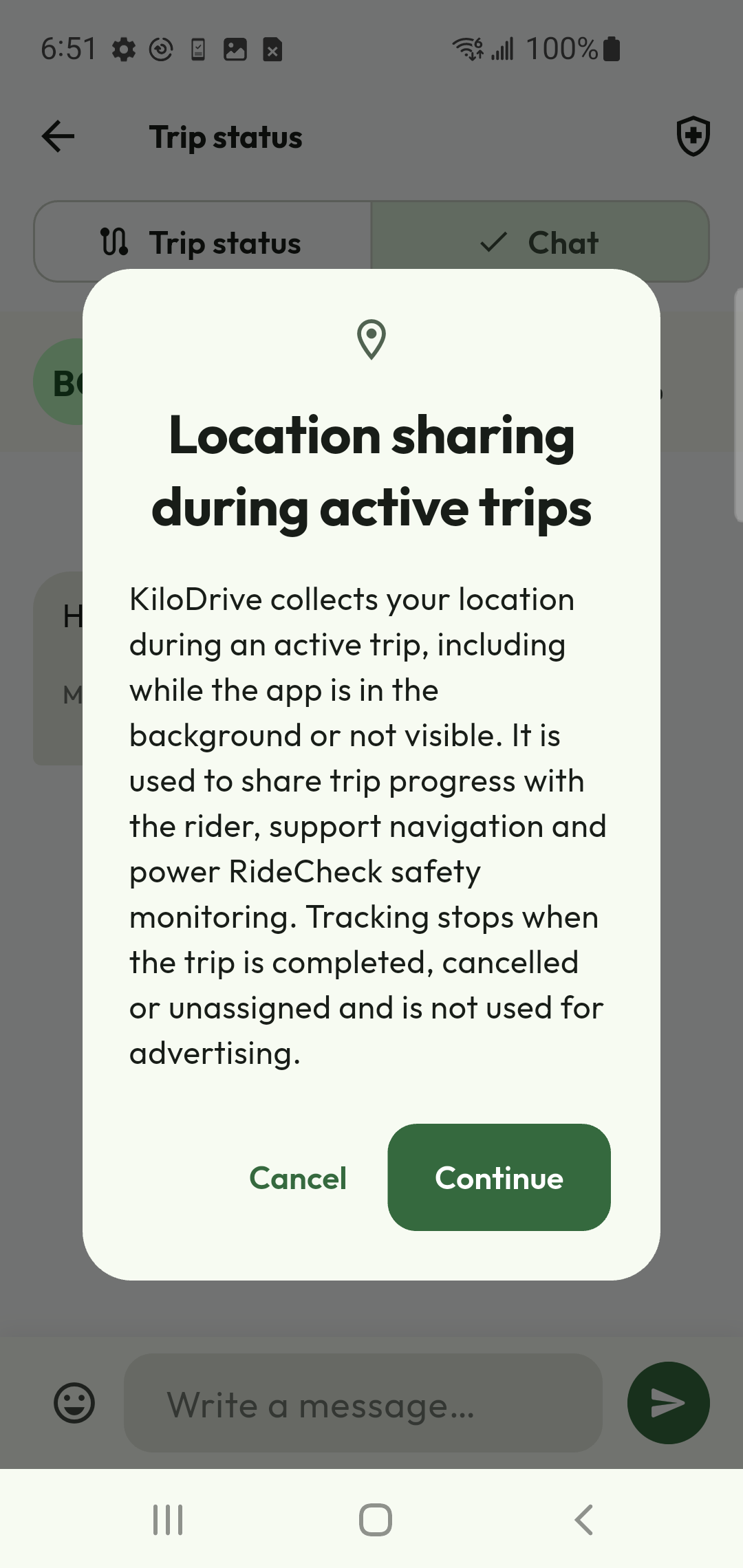
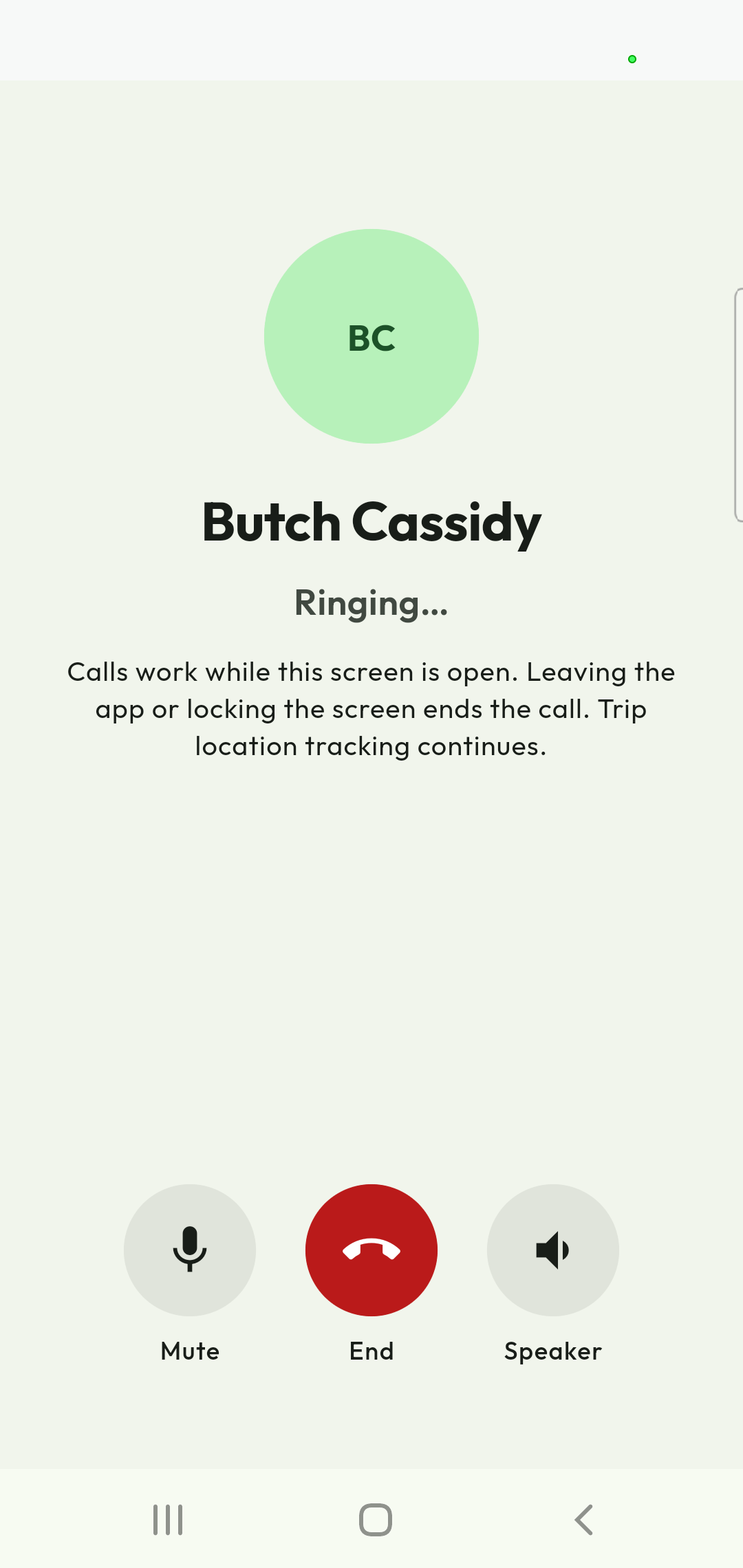
- Keep attention on the road; stop safely before typing or changing trip state.
- Use the full-screen map for route context. Check last update and accuracy before relying on a marker.
- Use Mark arrived, Start trip and Complete trip only when the current state and proof requirements allow them.
- For deviation, collision, threat or emergency, use the safety workflow and contact local emergency services immediately.
- After completion, verify trip, payment, receipt and rating eligibility independently.
Expected result. Rider and driver converge on the same lifecycle after refresh, and financial settlement is either terminal or explicitly unknown. Unknown is not failure and must not invite a duplicate charge.
Driver workflow 4Driver task procedure and recovery reference
| Task | Expected result | Next safe action if blocked |
|---|---|---|
| Complete onboarding | All saved steps resume across restart; final submission shows pending review and an estimated review window. | Open Verification and complete the one named missing/rejected item. |
| Upload licence/photo | Native picker/cropper returns to the same mounted route and saved preview remains after resume. | Retry once with supported JPG/PNG/PDF within 10 MB; report KD-2001 if it persists. |
| Add vehicle/documents | Vehicle shows Pending until identity, registration, insurance and fitness are reviewed separately. | Replace only the rejected or expired evidence and keep the admin reason. |
| Go online | Checklist is current and Go online succeeds only when every required gate is ready. | Follow the single next action; do not bypass the checklist or reuse stale client state. |
| Place or accept bid | One idempotent bid/assignment is recorded at the current revision. | For KD-1005 or KD-3001, refresh before deciding again. |
| Arrive/start/complete | Each transition advances once with required location/proof; both participants converge. | Refresh trip details. Preserve the original operation when outcome is checking/unknown. |
| Receive wallet fare | Escrow releases and net fare posts once; held/available balance and receipt agree. | For KD-4001, do not request another transfer; reconcile the original trip/payment. |
| Request cashout | Eligible amount moves to held and request shows pending review/settlement. | Check plan limits, available balance, payout method and fraud/cooldown guidance. |
| Membership purchase/change | Provider/store evidence, entitlement, renewal and wallet/store record converge. | Use Restore/Refresh; do not repurchase when entitlement is unknown. |
KiloDrive support codes
| Code | Meaning | Safe next step |
|---|---|---|
| KD-1001 | Invalid or incomplete request | Correct the marked value and submit once. |
| KD-1002 | Sign-in required | Sign in again and resume the saved workflow. |
| KD-1003 | Access denied | Confirm account, country and required step-up proof. |
| KD-1005 | State changed or conflict | Refresh and review the latest revision. |
| KD-1006 | Original operation in progress | Wait and check the same operation. |
| KD-1007 | Too many requests | Wait for Retry-After, then try once. |
| KD-1008 | Service temporarily unavailable | Retry once later and use the documented fallback. |
| KD-1009 | Unexpected or unconfirmed result | Check current status before another mutation. |
| KD-2001 | Verification or onboarding incomplete | Complete the named readiness item. |
| KD-3001 | Ride, bid or trip state prevents action | Refresh the trip and use its current permitted action. |
| KD-3002 | Location or route unavailable | Check GPS, permission, accuracy and connection. |
| KD-4001 | Financial result unknown | Do not repeat; reconcile the original operation. |
| KD-4002 | Financial operation rejected | Review payment, entitlement or provider guidance. |
| KD-4003 | Balance, limit or safety rule | Review available/held balance, limits and cooldown. |
| KD-5001 | External provider unavailable | Use the offered alternative or retry once later. |
| KD-6001 | Feature unavailable | Complete prerequisites or follow country/version policy. |
Support needs the KD code and correlation ID, plus trip/vehicle reference and time. Never send passwords, codes, tokens, complete payment data or unredacted identity evidence through ordinary support messages.
Driver referenceCurrent workflow and recovery
Choose your country and Drive and earn role and retain these choices through registration. Confirm your email for manual email signup and confirm the required phone number. Upload legible identity, licence and profile evidence, then add the vehicle and required registration, insurance and fitness evidence. Uploading a document is not approval. Review notes explain corrections; the authoritative activation checklist supplies the next action.
Identity, driver profile, document review, vehicle approval, membership or trial, payout readiness and safety acknowledgment are separate requirements. The API owns the readiness decision. An approved identity badge alone does not permit bidding or going online. Reload the checklist after review or a country/account change.
Review the latest offer, trip or booking before a state-changing action. A stale revision means another decision changed the record. Reload and review it before continuing. During a trip, expand the map for route context and use trip details for the next permitted arrival, start or completion control. Stale or inaccurate GPS is not proof of arrival. Avoid interacting with the app while driving.
Calls and chat require available connectivity, eligibility and provider service. Use the safe support/contact alternatives when they are unavailable. Read aloud is optional in accessibility settings and hidden by default. A timeout does not prove that a payment failed: check the original outcome and keep its support reference before another submission. Keep currencies separate when reviewing money.
Authorized operators can use the expandable mobile management domains for people, operations, finance, support, communications, system and insights. Follow the mobile administrator guide for evidence review, readiness refresh, top-up issuance and read-only investigation. A visible route is not proof that every mutation or provider is certified.
Current workflowGlossary
- Compliance gate
- The server-side evidence, vehicle, membership, block-list, duty, and trip-state checks a driver must pass before receiving or submitting a bid.
- Any driver
- An opt-in country-wide request surface governed by driver filters and notifications rather than only the Near Me expansion.
- Active-trip telemetry
- Location samples collected for approach, trip progress, safety, and RideCheck while an eligible assignment is active, including permitted background operation.
- Scheduled guarantee
- A state reached only after a reserved driver reconfirms and KiloDrive rechecks eligibility; a future request alone is not guaranteed.
- Chain of custody
- The ordered parcel pickup, OTP/QR, evidence, stop, delivery, failed-attempt, and return events that identify who held the parcel.
- Outbox
- The durable queue written with a business change so notifications and external effects can retry without repeating the financial or trip mutation.
- Smart ranking
- The proximity, ETA, traffic, eligibility, and quality score used to stage notifications. Standard rides remain negotiated and rider-selected.
- Membership entitlement
- The current Free, Silver, or Gold operational limits and service period verified by the API. KiloDrive does not deduct a trip commission from driver earnings.
- Primary vehicle
- The active assigned vehicle used for bidding eligibility; required registration, fitness, and insurance evidence must remain valid.
- Settlement ledger
- The immutable minor-unit records for fare, fees, taxes, tips, holds, releases, refunds, cash debt, and driver earnings.
Index
Active assignment 9–10
Active-trip location 13–15
Any driver 11–12
Auto-renew 19–20
Bid outbox 11–12
Billing history 19–20
Business driver 5–6
Calculators 23
Cash trip 17–18
Cashout 17–18
Chat 13–15
No commission 19–20
Delivery escrow 16
Demand heatmap 11–12
Destination mode 11–12
Document expiry 7–8
Driver arrived 13–15
Duty limits 21–22
Earnings ledger 17–18
Emergency 21–22
GPS completion 13–15
Identity 7–8
Membership 19–20
OTP 5–6
Payout method 17–18
Plate/tag 9–10
Portal 24
Privacy 21–22
Profile photo 7–8
Ratings 19–20
Recovery codes 5–6
Reports 24
Route anomaly 13–15
Scheduled guarantee 11–12
Support case 25
Settlement 17–18
Support 25
Vehicle assignment 9–10
Vehicle verification 9–10
Wallet 17–18